How to Connect Your Store to the System That Runs Your Business
Ask anyone who’s run an online store for a few years what the dullest job in the business is, and there’s a fair chance they’ll say the same thing. Getting orders from the website into the ERP.
Somebody does it. Usually it’s a person who was hired to do something else. They export a CSV, fix the columns that never quite line up, paste it in and hope the tax codes behave. On Fridays they do stock the other way round.
Nothing wrong with that, by the way. It’s a sensible way to start. It just stops being sensible around the time the store gets busy.
So this is a plain rundown of how an Adobe Commerce store gets connected to an ERP properly, what your options are, and where projects tend to go sideways. If you’d rather talk it through, that’s part of what our Magento development team does day to day.
When the Manual Way Stops Working
At forty or fifty orders a day it’s fine. Irritating, but fine. At four hundred the cracks show up, and they show up in boring places.
Stock first. Say the website thinks you’ve got 20 of something, because that’s what the midnight sync said. By lunchtime 18 have walked out over the trade counter. Two more people order online anyway, get a cheerful confirmation email, and then somebody has to ring them up and say sorry. One phone call, no big deal. Now picture it every day through a busy season, and what you’ve got is a customer service problem wearing a stock problem’s coat.
Then the typing. People copy orders wrong sometimes. A 12 becomes a 21, a flat number goes missing from an address. You find out when the parcel comes back.
Neither of these will sink you. They just put a lid on how big you can get before your spreadsheet person quits.
What Needs to Travel Between the Two
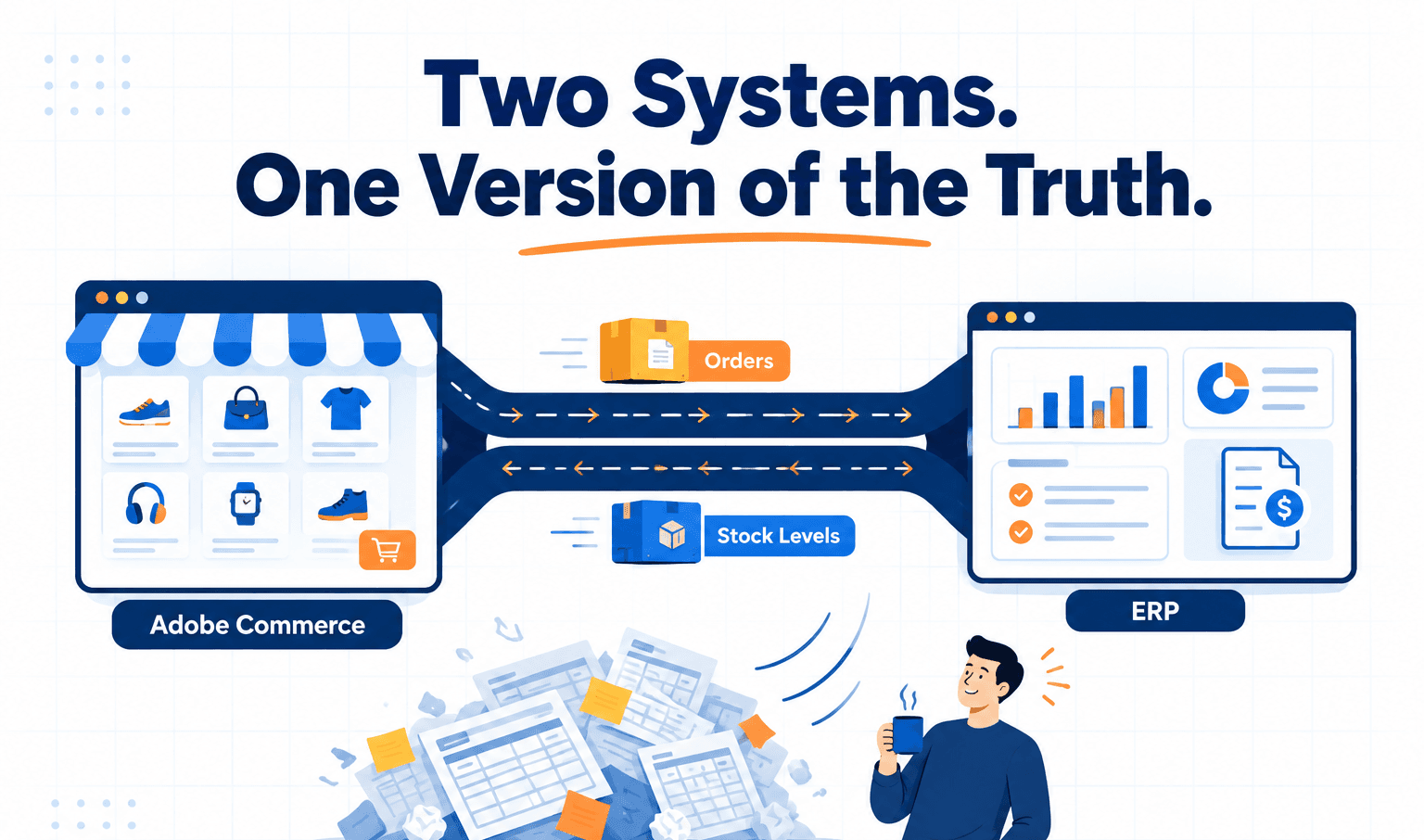
Five things, really: products, stock, orders, customers and invoices. They don’t all behave the same way, so it’s worth taking them one at a time.
Products usually start in the ERP (or a PIM, if you have one) and head for the store. Prices, names, specs, categories. And here’s the bit nobody warns you about: SKUs. If the item number in the ERP and the SKU in Magento aren’t identical, character for character, you end up building a lookup table, and then somebody has to feed that table every time a product gets added. Sort the SKUs out first. It’s tedious and it’s worth it. If you’ve got several warehouses, Magento’s Multi-Source Inventory, which comes with Adobe Commerce and recent Magento 2 versions, can take quantities per location, and that saves a lot of grief later.
Stock is where the money is. A sync that runs every four hours means four hours of flying blind. Aim for minutes, or seconds if you can manage it. And if you ship from more than one place, send each location’s number, not one big national total, otherwise the store can’t make sensible choices about where an order should come from.
Orders travel the other way, from store to ERP, with every line item, tax amount, shipping method and address landing in the right field. Then the shipment status comes back, tracking number and all, so the customer gets their email without anyone lifting a finger.
Customers need matching, not duplicating. Email address is the usual key. Trade accounts are fussier. If your ERP holds credit limits and payment terms, the store should know about them. We often build these with our B2B Suite for Magento 2 for company accounts, and customer groups let you stop an account on credit hold from being offered net terms at checkout, which our Payment Restriction extension handles. Invoices, last of all, should show up in the customer’s account so they can grab a copy without emailing your accounts team.
Four Ways to Build It
There’s no single right answer here. This is roughly how we think about it.
If a decent ready-made connector exists for your ERP, and your orders are fairly ordinary, start there. It’s quicker and cheaper. The catch comes when your business doesn’t follow the standard script. A B2B order with approval steps and contract pricing means modifying the connector, and the savings start to evaporate.
Middleware, things like Celigo, Boomi, MuleSoft or Azure Integration Services, earns its keep if you already own one or if more than two systems are involved. It handles mapping, retries and alerts, so you don’t have to write them from scratch.
A custom build over the APIs costs more and takes longer. Adobe Commerce has proper REST and GraphQL APIs and most ERPs have their own, so a small service can sit in the middle and apply your business rules. We’d go this way when the rules are unusual or nothing off the shelf fits your ERP.
The newer option is event driven. On Adobe Commerce Cloud, the store can fire an event the moment an order lands, using Adobe I/O Events, and an App Builder app hands it to the ERP. No polling, less lag. It’s where Adobe is heading, although people who know App Builder are still harder to find than people who know Magento PHP.
A Word on Specific ERPs
Odoo is popular with growing mid-sized businesses and it’s friendly to connect to. Its external API (XML-RPC or JSON-RPC) handles two-way sync of products, customers, stock and orders, and invoices come from confirmed sales orders, so that part’s tidy.
Dynamics 365 Business Central suits a business that’s already a Microsoft shop. Credit limits and terms can travel across to the store, which matters a lot for B2B.
SAP is the hard one. Its pricing conditions don’t map neatly onto Magento’s pricing, so expect middleware, SAP’s own integration suite or custom work, and give discovery a proper chunk of time before anyone opens an editor.
NetSuite has ready-made connectors that cope with standard flows. If your pricing or checkout is odd, a custom build against its API tends to be the safer route.
Where Projects Go Wrong
Most overruns come down to the same handful of things, and almost none of them are really about code.
SKUs that don’t match, as above. No clear owner for each type of data, so prices get edited in both systems and quietly fight each other. Stock syncing overnight. Records that fail silently, so nobody notices for a fortnight. Testing only on the tidy sample data the developers made up, then meeting a real catalogue, duplicate emails and strange tax setups included, on launch day. And nobody watching it afterwards, until an API update breaks something on a Saturday.
One more, and it catches a lot of people out: treating it like installing a plugin. It’s a business process project that happens to involve code.
Where We’d Start
Before anyone writes code, write a mapping document. For each flow: which way it goes, how often, which system is the boss, and what happens when it fails. Check that the SKUs line up. Get the odd rules out of people’s heads and onto paper.
It sounds like homework, and it is. But the teams that do it usually find the build itself is the easy part. The ones that skip it find the gaps halfway through, when changing course costs the most.
If you’re planning an ERP connection for your Adobe Commerce store, or you’ve got one that keeps misbehaving, get in touch with MageBytes and we’ll talk it through. You can also look through our ecommerce development services to see what else we do around the store.
Planning an ERP Integration for Your Adobe Commerce Store? Start with a scoping conversation. We’ll help you map the data flows and choose an approach before any code is written. Book a free scoping consultation.