Why Your B2B Customers Are Quietly Switching to Suppliers Who Have It
There is a pattern in B2B ecommerce that most store owners notice too late. A customer who has been ordering reliably for two years quietly reduces their order frequency. A few months later they have moved most of their spend to a competitor. When you finally ask what happened, the answer is almost always some version of the same thing: placing orders on your site takes too long.
Not the product. Not the price. The ordering process.
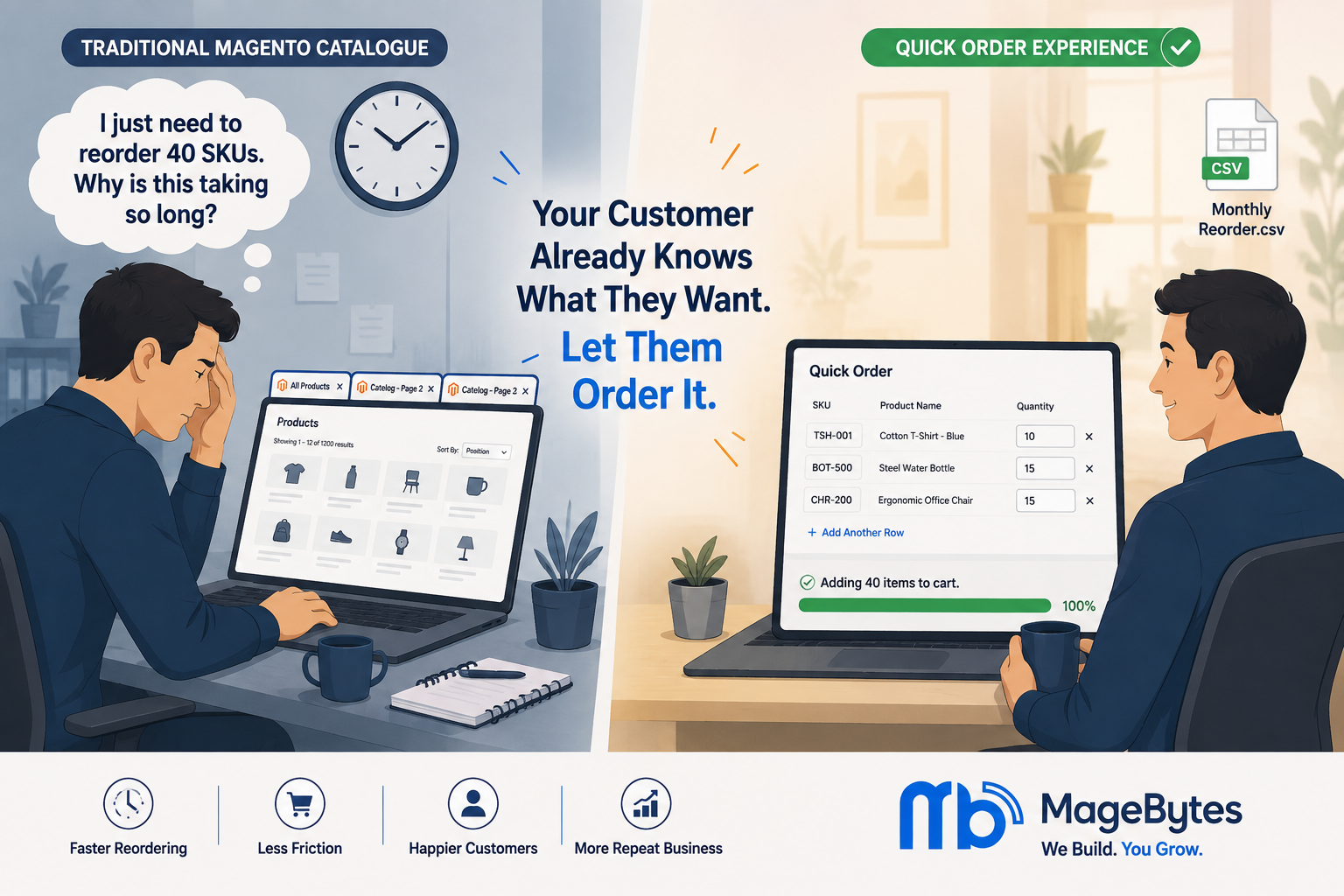
A B2B buyer who needs to reorder 40 to 50 SKUs on a regular cycle does not need to browse your catalogue. They came to your site knowing exactly what they want, knowing the SKUs, knowing the quantities. What they need is to enter that information and get to checkout. What your standard Magento store gives them is a grid of products to scroll through, individual product pages to open, quantities to enter one at a time, and a cart that fills slowly while they work through the list.
For one or two items, that is fine. For a trade buyer reordering a monthly stock rotation, it is a genuine friction point that adds up to 30 or 40 minutes per order. And once a competitor solves that problem for them, switching cost drops to near zero.
The MageBytes Quick Order extension for Magento 2 exists specifically to fix this. It gives buyers three fast paths to completing a large order without touching the product catalogue at all. This blog explains what the extension actually does, who it is built for, and why the stores that deploy it typically see an immediate improvement in repeat order rates from their B2B customer base.
What Standard Magento Checkout Actually Costs Your B2B Customers
The standard Magento catalogue experience was designed with discovery in mind. A shopper who does not know exactly what they want can browse categories, filter by attributes, compare products, read descriptions, and gradually narrow down to a purchase decision. That journey is well-designed for retail.
But B2B buyers are not on a discovery journey. A restaurant supply company reordering cleaning products, a manufacturing firm replenishing consumables, a retail chain topping up stock from a wholesale supplier, these buyers have a list. The catalogue is not useful to them. Navigating it is the overhead they resent.
Time the process once with a real B2B buyer placing a 30-item reorder through a standard Magento store. Opening each product page, entering a quantity, returning to the catalogue, finding the next item, opening its page, entering the quantity, repeat, takes between 45 seconds and two minutes per line item. A 30-item order runs to 30 to 60 minutes of active navigation. Every month.
That time cost is invisible to you. It is very visible to your customer.
Forrester’s B2B Buyer Experience research found that 60 percent of B2B buyers say that a difficult online ordering experience is a primary reason for switching suppliers. Not product quality. Not price. The ordering experience itself. For any B2B Magento store where repeat orders are a core revenue stream, this is the number that should determine how much priority you give to solving the ordering workflow.
The fix does not require a platform change, a custom development project, or a significant budget. It requires a well-built extension that adds a Quick Order page to your store and gives buyers the three input methods that actually match how they work.
Three Ways to Add Products, Designed Around How B2B Buyers Actually Work
SKU entry with autocomplete
For buyers who work from a known SKU list, this is the fastest possible input method. They type the SKU or start typing the product name and the extension pulls matching results immediately with autocomplete. The buyer confirms the right product, enters a quantity, and moves to the next line.
The autocomplete matters more than it might seem. Without it, a buyer entering a SKU has to trust that they typed it correctly and will not discover the error until they reach checkout. With autocomplete, every line item is visually confirmed against the actual product, including name and image, before it gets added. That confirmation reduces checkout errors and the customer service conversations that come from mis-entered SKUs.
For Magento stores serving trade buyers who place orders from internal procurement documents, this single feature can cut their order completion time from 45 minutes to under 10. That reduction is real enough that buyers notice it immediately and start preferring the Quick Order page over other ordering methods.
Product name search
Not every buyer works from a SKU list. Some buyers know what they need by product name and category but would have to look up the SKU. The Quick Order extension supports product name search with real-time suggestions alongside SKU entry, so buyers can search the way that works for them.
The practical benefit here is reducing the barrier to using the Quick Order form for buyers who might otherwise default to catalogue browsing because they do not have SKUs memorised. Once a buyer uses the form and finds it faster, they typically build their ordering workflow around it. Product name search is what makes the Quick Order form accessible to buyers at different points in their relationship with your catalogue.
CSV upload for bulk and repeat orders
This is the feature that genuinely changes the operational experience for high-volume or high-frequency buyers. A buyer with a regular monthly reorder saves their SKU and quantity list as a CSV file the first time they order. Every subsequent month, they open the Quick Order page, upload the file, and the extension validates every line against current stock and product data automatically.
The validation happens before checkout, not after. If an SKU has been discontinued, if a quantity exceeds available stock, or if a configurable product requires an option that was not specified in the CSV, the extension flags those lines and shows what needs to be corrected. The buyer fixes the issue in the same interface, not by restarting the order from scratch.
For a supplier managing wholesale buyers who place large orders on fixed schedules, CSV upload effectively removes the ordering overhead entirely. What was previously a 45-minute manual process becomes a two-minute file upload and a review of any flagged lines. Buyers who experience this once will not use any other ordering method for their repeat purchases.
What the Extension Handles That Most Buyers Do Not Expect
All product types, including configurable and bundle
One of the gaps in simpler quick order implementations is that they only support simple products. A B2B buyer who needs a configurable product, a bundle product, or a downloadable product cannot use the form and falls back to catalogue browsing for those items.
The MageBytes Quick Order extension supports simple, configurable, bundle, virtual, and downloadable product types. Configurable products, the ones with size and colour variants or other selectable attributes, can be configured directly in the Quick Order interface without opening a separate product page. The buyer selects the attribute options inline and moves on. For a clothing wholesaler or an industrial supplier with product variants, this is a critical capability that most quick order extensions do not provide.
Inline product preview before checkout
Every line item in the Quick Order form shows the product image, current price, quantity entered, and line total before the buyer adds anything to cart. This is the confirmation layer that prevents ordering errors, particularly for buyers using CSV upload where they cannot visually verify each item during entry.
A buyer who uploads a 40-line CSV and can see a clean list of all 40 items with their prices and subtotals before committing to cart can spot a wrong quantity, a discontinued product, or an unexpected price change at this stage rather than at checkout or, worse, after the order has been placed.
Pagination for large order lists
For buyers placing orders with 50, 100, or 200 line items, a single scrolling list becomes unusable. The extension handles large order lists with built-in pagination so the interface stays responsive and navigable regardless of order size. This is an operational requirement for genuine wholesale buyers that the extension addresses natively rather than asking the buyer to break their order into smaller sessions.
One-click add all to cart
Once the buyer has reviewed their complete order list and is satisfied with everything, a single Add All to Cart button moves every line item to the shopping cart simultaneously. The buyer does not have to add products one at a time or page through the list adding each section. The entire order moves to cart in one action, and the buyer proceeds to checkout. This is what the whole workflow builds toward: from a list of SKUs to a populated cart in the minimum number of steps. See the extension demo on the MageBytes store to see this in action.
Hyvä and PWA Studio compatible
The extension is tested and supported on Hyvä Theme and PWA Studio builds as well as standard Magento 2.4 installations. For stores running Hyvä for frontend performance reasons, Quick Order works within the Hyvä component architecture without requiring a separate frontend build. This compatibility is listed explicitly in the product’s tested platforms and covers Adobe Commerce Cloud, Adobe Commerce on-premises, and Magento Open Source through version 2.4.9 with PHP 8.5.
The B2C Case: Not Just for Trade Buyers
The extension was built for B2B and wholesale, and that is where it delivers the most obvious ROI. But it is worth mentioning the B2C use case because stores that dismiss it as a B2B-only tool miss a meaningful segment of their own retail customers.
Think about who else places repeat orders from a known list. A restaurant owner ordering weekly from a restaurant supply store. A tradesperson replenishing the components they use regularly. A gym owner restocking supplements on a monthly cycle. A business buying office supplies for a team. These are retail customers, not trade buyers, but their ordering behaviour is identical to a B2B buyer: known products, known quantities, minimal interest in browsing.
For these customers, discovering the Quick Order form is a genuine improvement to their experience. It is the kind of feature they tell other people about. For a B2C store in a category where repeat purchasing is common, this word-of-mouth benefit from a single well-built extension is commercially real, if harder to measure than repeat order rate.
Who Gets the Most Value from This Extension
Wholesale and trade suppliers
The primary use case. A Magento store serving wholesale buyers with large catalogues and regular repeat orders sees the clearest and most immediate improvement in order efficiency. If your B2B customers are currently ordering by phone, by email with a spreadsheet attached, or by visiting your store in person because your online ordering is too slow, Quick Order is the conversion that brings them online and keeps them there.
Industrial and manufacturing distributors
Component distributors, industrial supply companies, and manufacturers selling direct to trade buyers typically deal with orders of 20 to 200 line items placed on weekly or monthly cycles. The CSV upload feature with automatic validation maps directly to how procurement teams in these organisations work: a spreadsheet from an ERP system gets exported, converted to a CSV, and uploaded. No manual entry required.
Restaurant and foodservice suppliers
Restaurant buyers reorder the same products with minor weekly variations. The Quick Order form, once set up with their regular SKUs, becomes the default interface for placing weekly orders. The time saving per order across an entire buyer base is substantial.
Agencies managing B2B Magento stores
For a Magento development agency managing client stores that serve trade buyers, Quick Order is a relatively small extension investment with a disproportionately large impact on client satisfaction and buyer retention. It is the kind of recommendation that clients often do not make themselves because they have normalised the slow ordering experience, but one that produces visible results immediately after deployment.
Pricing, Compatibility, and Getting Started
The Magento 2 Quick Order extension is priced at $99 for the Community Edition and $149 for the Enterprise and Adobe Commerce Cloud editions. Every purchase includes twelve months of free updates, direct engineer support, and a 30-day money-back guarantee.
The extension is compatible with Magento Open Source 2.4 through 2.4.9, Adobe Commerce on-premises 2.4 through 2.4.9, and Adobe Commerce Cloud. It is also tested on Hyvä Theme and PWA Studio. The July 2026 update (version 1.0.3) verified compatibility with Magento 2.4.9 and PHP 8.5.
Installation follows standard Magento module practices with no core file overrides, which means it is upgrade-safe and compatible with standard Magento deployment workflows including Composer-based installations. The extension configuration is handled entirely through Magento Admin.
The frontend demo is available at demo-quick-order.magebytes.com and is worth looking at before purchase. It shows the complete buyer experience: SKU entry, name search, CSV upload, inline validation, and the Add All to Cart flow. Seeing the workflow takes about two minutes and makes the extension’s value case for your specific buyer type immediately clear.
If you are evaluating whether Quick Order fits your specific store configuration, customer base, or Magento version, the MageBytes team can answer those questions directly. Reach us through the contact page or explore the full MageBytes extension library for other tools built for Magento merchants running B2B and B2C operations.
The Straightforward Case for Installing This
B2B ecommerce is an area where the gap between what a buyer needs and what a standard retail-focused Magento installation provides is particularly wide. The catalogue browsing experience works for retail shoppers. It does not work for procurement teams with a list.
Quick Order closes that gap. It takes the ordering workflow that buyers already use, a list of SKUs and quantities, and turns it into the primary input method rather than an afterthought. The CSV upload feature alone has converted more than a few B2B stores from email and phone ordering to fully online, because buyers who previously could not be bothered with the slow catalogue experience now have a method that matches the way they actually work.
That is what a good extension does. It makes the existing behaviour easier, not a new behaviour necessary.
The extension is $99 for the Community Edition and the 30-day money-back guarantee means there is no real risk in finding out whether it works for your buyers. If your store has any meaningful volume of repeat orders from buyers who know their SKUs, the answer is almost certainly yes.
Give Your B2B Buyers the Ordering Experience They Actually Want. Magento 2 Quick Order by MageBytes. SKU entry, name search, CSV upload, and one-click bulk add to cart. Community $99 | Enterprise $149. Get the extension and see the live demo.