There is a specific kind of expensive that most ecommerce operations teams do not measure properly. Not the obvious expensive: the ad spend, the returns, the logistics cost. The other kind. The 40 minutes a day your ops person spends copy-pasting order details between your store and your 3PL system. The customer who bought something two hours ago and still has not received a confirmation because someone forgot to check the queue. The inventory spreadsheet that was accurate on Monday and is wrong by Thursday because nobody connected it to anything.
None of these are unsolvable problems. They are just unmated ones. Every one of them has a workflow that sits somewhere between a five-minute Zapier Zap and a properly built n8n automation, depending on your volume and how complex the logic needs to be. The return on those workflows is usually visible within a week.
This is a practical list, not a conceptual one.
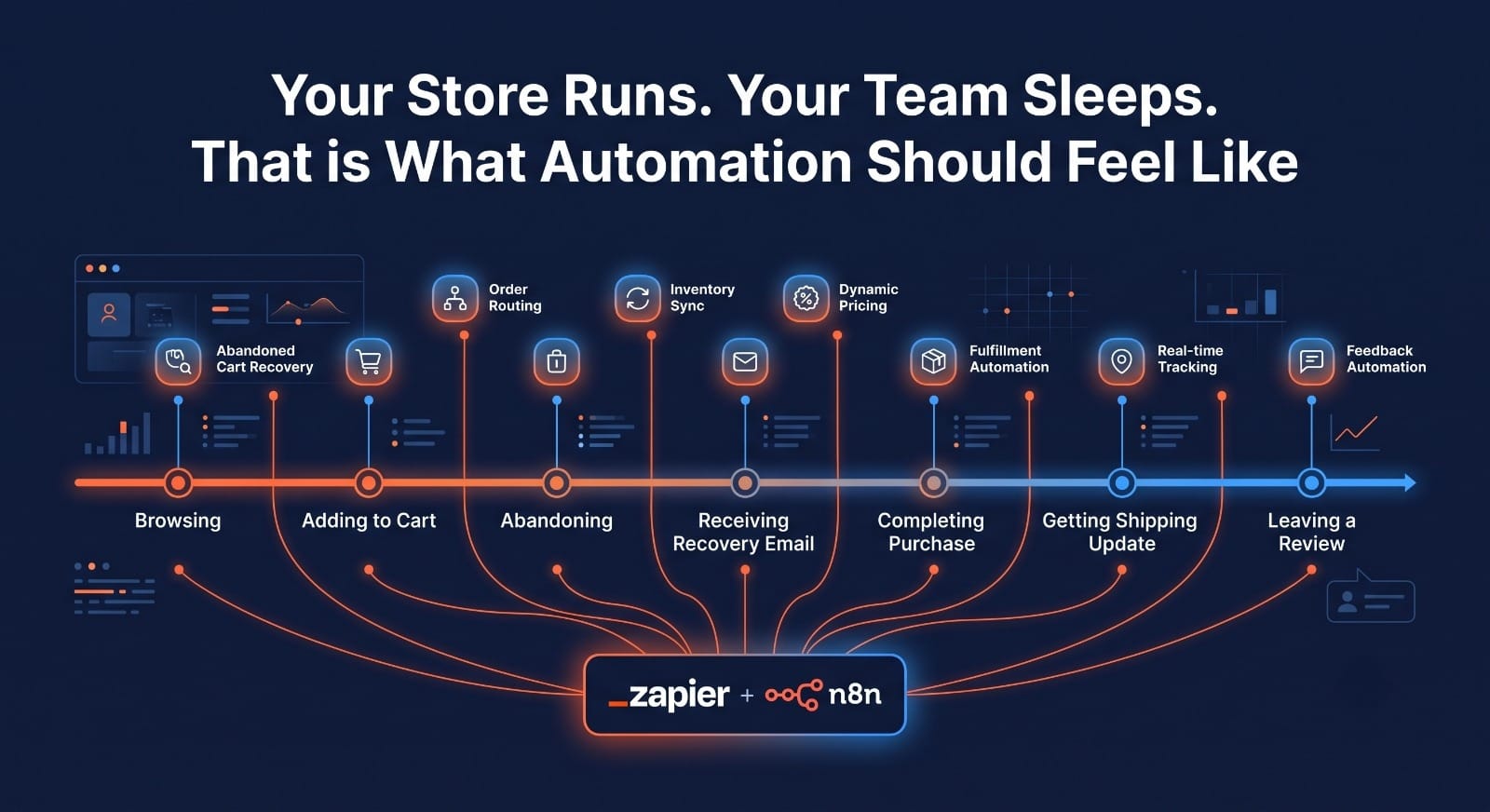
Each workflow below is one that we have built for ecommerce clients running Magento, Shopify, WooCommerce, and BigCommerce platforms. For each one we have noted whether Zapier handles it cleanly, whether n8n is the better tool, and what the trigger and logic actually look like in practice. Take the ones that apply to your business and build them.
Workflow 1: Abandoned Cart Recovery
Industry data puts abandoned cart email recovery at somewhere between 5 and 10 percent conversion on the emails that actually land at the right time. That number sounds modest until you work out how many carts are abandoned on a store doing 200 orders a day. Roughly 300 to 400 additional carts, conservatively, sitting uncaptured.
The workflow is well understood but the timing and sequencing are where most stores get it wrong. One email sent immediately after abandonment is the least effective version of this automation. A sequence works better: a first message at 1 hour that is plain, non-pushy, and mentions the specific items left behind. A second at 24 hours if no purchase. A third at 72 hours with a small incentive if the value justifies it.
How it works on Zapier: Trigger on the Shopify or WooCommerce webhook for abandoned checkouts. Filter for carts above a minimum value threshold to avoid wasting emails on single-item low-value sessions. Connect to Klaviyo, Mailchimp, or ActiveCampaign to enrol the customer in the sequence. Add a delay step and a condition check before the second send to confirm the cart is still abandoned.
Why n8n is better at volume: Zapier charges per task and a three-step abandoned cart flow fires three tasks per abandoned cart. At 400 abandoned carts per day, that is 1,200 tasks per day, or around 36,000 per month. On n8n, the entire workflow is one execution. At that volume, the cost difference is significant and the n8n version lets you add AI personalisation to the email body using a language model node without adding a separate tool.
One thing that kills this workflow more than anything else: building it before your cart abandonment data is clean. If your store does not reliably capture the customer’s email before checkout exit, the trigger has nothing to work with. Sort the data capture first, then build the automation.
Workflow 2: Smart Order Routing to Fulfilment
Single-warehouse stores with no dropship component can skip this one. Everyone else needs it.
The manual version of order routing, someone looking at an order, checking which warehouse has stock, deciding which 3PL or supplier should fulfil it, and entering that into a system, takes somewhere between 2 and 8 minutes per order depending on complexity. A store processing 300 orders per day is spending between 10 and 40 hours per week on a task that should take zero human hours once it is set up correctly.
The routing logic varies but the common decision tree covers: geographic proximity to the shipping address, which fulfilment location has all items in stock, whether the order is expedited (which affects warehouse cutoff times), and whether the order value triggers specific handling like signature confirmation.
The trigger: A new order webhook from Shopify, Magento, WooCommerce, or BigCommerce. The logic runs through an IF node checking the conditions above in sequence. The action fires an API call or a webhook to the relevant 3PL system, creates the pick job, and updates the order record with the assigned fulfilment location.
Zapier vs n8n here: For a simple two-warehouse setup with straightforward logic, Zapier handles this. For stores with three or more fulfilment locations, product-level routing rules, or complex backorder logic, n8n is the better tool because the branching structure in Zapier gets unwieldy and expensive as the decision tree grows. One client we built this for was processing 400 orders per day across three warehouses and a dropship supplier. The n8n workflow handles about 1,600 routing decisions per day at a total automation cost of under $50 per month.
Important: build the routing logic in a staging environment before touching live orders and test it with edge cases. An order containing one item from warehouse A and one item only in stock at warehouse B needs a defined rule, not a silent failure. Define your split-order behaviour before you automate it.
Workflow 3: Real-Time Inventory Sync Across Channels
Overselling is one of the cleanest ways to damage customer trust and trigger chargebacks at the same time. It happens when your Shopify store shows 3 units available, your Amazon listing shows the same 3 units, a customer buys one on each platform in the same 90-second window, and your warehouse has 3 total. Now someone is getting a cancellation email.
The fix is an inventory sync that propagates every stock change, every sale, every return, and every manual adjustment across all channels in near real-time. Not a nightly batch. Not a manual export. Near real-time, meaning within seconds or at most a few minutes.
What the workflow does: A webhook fires every time an order is placed or a stock adjustment is made in the source-of-truth system, whether that is your WMS, your ERP, or your primary store. The workflow reads the new quantity, formats it for each destination channel, and makes the API update call. For Shopify this is a straightforward inventory level update. For Amazon it is an inventory feed or a direct MWS API call. For a custom database or a connected ERP system, it is an HTTP request to the relevant endpoint.
When to use Zapier: Two channels, simple logic, low to medium order volume. Zapier’s Shopify integration is solid and the setup takes an afternoon.
When to use n8n: Three or more channels, any product with variants across multiple locations, or any store doing meaningful volume on marketplaces where an hour-old inventory count is a real commercial risk.
For stores with 1,000 or more SKUs across more than three channels, dedicated inventory middleware like Linnworks or Skubana is worth evaluating alongside a workflow tool. The workflow tool handles the API calls; the middleware provides the reconciliation layer and audit trail that a general automation platform does not include out of the box.
Workflow 4: Post-Purchase Review Request at the Right Moment
Most stores either do not ask for reviews or ask for them at the wrong time. Sending a review request the day after purchase, before the product has arrived, is the most common version of the wrong time. The customer is annoyed, not grateful.
The right time is a specific window after confirmed delivery. Not after the estimated delivery date. After the tracking data shows the package was actually received. That distinction requires a workflow that polls your shipping carrier’s tracking API or listens to a webhook from ShipStation, EasyPost, or your logistics platform, waits for a delivered status event, and then fires the review request on a short delay, typically 2 to 3 days later to allow the customer to actually use the product.
The logic: Trigger on order fulfilment or a tracking webhook. Use a Wait node to hold execution for 2 to 3 days post-delivery. Check one more time that the order was not subsequently returned. If the order is still complete, send the review request email or SMS. If the customer has contacted support in the intervening period, skip the request to avoid asking for a review from someone who had a problem.
With n8n’s AI nodes: The review request email can be dynamically generated using the product name, category, and a language model node that writes a 2-sentence personalised opener based on what the customer ordered. A pet supply brand using this approach with a specific mention of the product they bought consistently outperforms a generic template. The email does not look automated.
Industry data from 2025 shows that automated review requests sent 48 to 72 hours after confirmed delivery convert at roughly 3 to 5 times the rate of requests sent immediately after purchase. The timing is the entire mechanism.
Workflow 5: Low Stock Alert and Reorder Trigger
Stock-outs have a double cost: the immediate lost sale and the SEO cost of a product page going out-of-stock and losing ranking. For stores running on Magento or Shopify, that second cost is real and it accumulates over time.
The workflow is simpler than people expect. A scheduled trigger, either a daily cron or a per-order webhook, checks inventory levels against a reorder threshold per SKU. When any SKU drops below its threshold, the workflow fires a Slack or email alert to the purchasing team with the product name, current stock level, average daily sales over the last 14 days, and estimated days until stockout at that velocity.
For stores connected to a supplier API or an Odoo ERP system with purchase order management, the workflow can go further and draft a purchase order for the buyer’s review rather than just sending an alert. The buyer reviews, approves, and the PO sends. Human oversight stays in the loop; the manual data gathering does not.
The n8n advantage: If you want velocity-based thresholds where the reorder point adjusts based on recent sales rate rather than a static number, that calculation belongs in a Code node. Zapier cannot do that kind of in-workflow arithmetic without routing through a Google Sheets formula, which works but adds fragility. A 10-line JavaScript node in n8n calculates it cleanly and keeps the logic in one place.
This is also the workflow where the quality of your product data matters most. If your SKUs are inconsistently formatted between your store and your warehouse system, the inventory level check will return mismatches on some products and you will get alerts for items that are not actually low. Fixing the SKU mapping is not glamorous but it is what makes the automation reliable.
Workflow 6: Returns and RMA Processing
Returns are the workflow most stores leave manual the longest, usually because the process involves enough edge cases that automating it feels risky. The risk is real if you try to automate the whole thing. The waste is also real if you automate none of it.
The practical middle ground is automating the predictable parts and keeping humans on the exceptions. The predictable parts are: acknowledging the return request, generating and sending the return shipping label, creating the RMA record in the order management system, and queuing the inventory restock when the item arrives back and passes inspection.
A fashion retailer handling 60 returns per week documented this clearly. Their previous process took about 12 minutes per return across email review, RMA creation, label generation, and inventory update. A Zapier workflow cut that to under 2 minutes per return: customer submits the return form, the workflow creates the RMA in the OMS, calls the EasyPost API to generate a return label, sends the customer the label by email, and tags the order for inventory reconciliation on receipt. The time saving across 60 returns per week is roughly 10 hours of staff time, every week.
Where n8n adds value here: If your returns policy varies by product category, by customer tier, or by order value, the conditional logic for whether to auto-approve or flag for review belongs in a proper branching workflow. A premium customer requesting a return on a high-value order probably gets a different process than a first-time customer returning a discounted item. n8n handles multi-branch return routing cleanly. Zapier requires workarounds for that level of conditional logic.
CRM connection: If you are running Salesforce CRM or a connected support platform, the return workflow can also log the return reason against the customer’s CRM record and flag any customer with more than two returns in a 90-day period for the account management team. That data compounds over time into a useful signal about product quality and customer fit.
Workflow 7: High-Value Order Alert and VIP Customer Tagging
Most automation conversations focus on volume tasks. This one is about the orders that matter most commercially.
A high-value order, whatever threshold makes sense for your store, is not just a bigger transaction. It is a potential long-term customer, a candidate for personal outreach from a senior account manager, and a data point for building a lookalike audience in your paid media campaigns. None of that happens reliably if the order disappears into the standard fulfilment queue with no differentiation.
What the workflow does: Trigger on new orders above a defined value threshold. The workflow simultaneously does four things: sends a Slack notification to the relevant team member or channel, tags the customer in the CRM as a VIP and updates their customer segment, adds the customer’s email to a high-value segment in the email platform for the post-purchase follow-up sequence, and optionally feeds the customer’s data to a Meta or Google audience for lookalike campaign seeding.
The Meta and Google audience connection is the part that most stores skip and probably should not. A custom Shopify store or WooCommerce store feeding its highest-value customers automatically into a lookalike audience seed list is building a paid media targeting asset every time a premium order comes in. Over three to six months, that audience becomes meaningfully better than a cold demographic target.
Platform choice: For a straightforward threshold trigger with four action steps, Zapier builds this in about 30 minutes. If you want to enrich the customer record with additional data before tagging, or if the VIP criteria is more complex than a simple order value threshold, for example combining order value with purchase frequency or product category, n8n handles the conditional scoring logic more cleanly.
One thing worth doing alongside this workflow: create a corresponding de-tagging rule. If a customer tagged as VIP has not purchased in 18 months, remove the tag and adjust their segment accordingly. An automation that only adds tags and never removes them produces a CRM that becomes less accurate over time, not more.
Which One to Build First
If you are starting from scratch: abandoned cart recovery. It is the highest ROI automation in ecommerce, the trigger is straightforward, and the payback is measurable within the first month. Almost every major email platform connects to Shopify and WooCommerce natively, so the build is not technically demanding.
If your operations team is spending more than two hours per day on manual fulfilment tasks: order routing and inventory sync, in that order. The time cost of manual routing compounds daily and the automation frees up staff for work that actually requires judgment.
If your store is already automated on the basics but you are not capturing review or repeat purchase data well: the review request workflow and the VIP tagging workflow together form the foundation of a proper retention and loyalty stack. They feed each other over time.
For stores on Magento, Shopify, or WooCommerce that want these workflows built and maintained properly rather than cobbled together from templates, MageBytes builds and manages ecommerce automation systems across Zapier, n8n, and Make depending on what the store’s volume and logic complexity actually requires. The right tool varies. The goal does not.
One warning that appears at the end of every practical automation list: do not automate a broken process. If your order routing logic is wrong when a human does it, an automation will do it wrong thousands of times per day instead of tens. Map the process manually first, confirm it works correctly, then automate it. The documentation step takes an hour. Undoing a badly built automation that has been running for three months does not.Want These Workflows Built for Your Store? MageBytes builds production automation on Zapier, n8n, and Make for Magento, Shopify, WooCommerce, and BigCommerce stores. Tell us which workflows you need. Get in touch here.