Controlling LLM Spend with Tiered Model Routing
Most teams building AI products right now share a version of the same billing surprise. The prototype worked beautifully and the costs looked manageable. Then the user base grew, the number of daily requests climbed, and the monthly API invoice started looking like a second payroll. Nobody had planned for it because nobody had actually run the numbers on what happens when one premium model handles every request from every user for every task regardless of how simple or complex that task actually is.
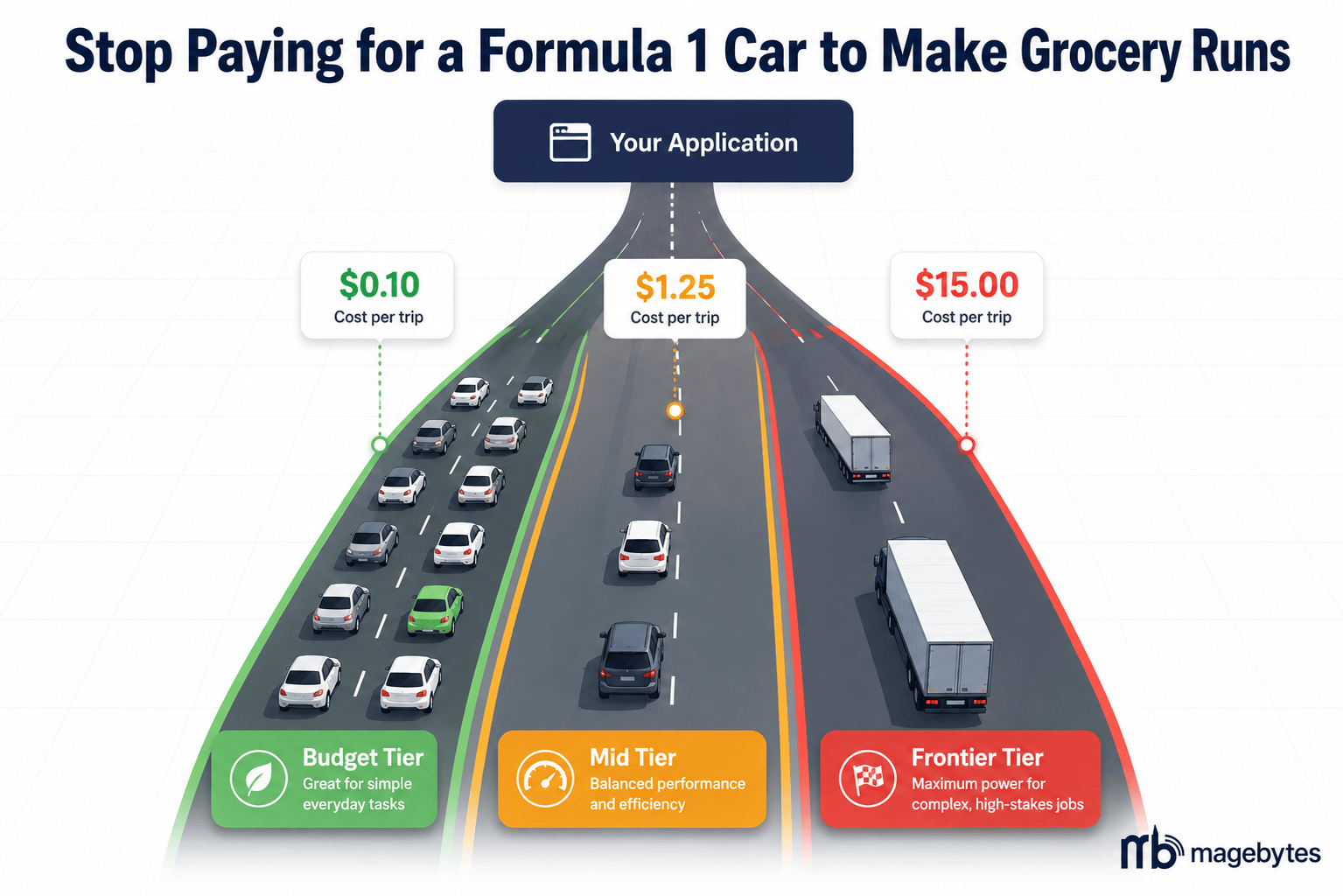
The answer to that problem is not to use worse models. It is to stop using the same model for everything. A query asking for an order status check does not need the same reasoning capability as a query asking for a multi-step financial analysis. Treating them identically is the most common and most expensive mistake in production AI systems right now.
Tiered model routing, the practice of directing each incoming query to the cheapest model that can handle it reliably, is the single highest-impact cost optimisation available to any team running LLMs in production. Done correctly, it reduces per-query spend by 60 to 80 percent without any measurable drop in output quality. This blog covers the real pricing landscape in mid-2026, how the routing decision works in practice, and how to implement it in a production workflow. If you are evaluating custom AI solutions for your business and cost predictability is part of the decision, this is the piece to read before you commit to a model or an architecture.
01 The Real Numbers: What Each Model Tier Actually Costs in 2026
LLM pricing has dropped dramatically across the board over the past 18 months, which is genuinely good news for teams building at scale. The pricing spread between the cheapest capable model and the most powerful flagship model has also widened considerably, which is where the routing opportunity lives.
Here is what the mid-2026 pricing landscape looks like in concrete terms across the major tiers and providers, measured in cost per million tokens:
Budget Tier: For classification, FAQ, and simple lookups
- GPT-4.1 Nano: $0.10 input, $0.40 output per million tokens. The cheapest option from OpenAI’s current lineup and well-suited for high-volume simple tasks.
- Gemini 2.5 Flash-Lite: $0.10 input per million tokens. Google’s most aggressive budget entry point, with a generous free tier for prototyping.
- Claude Haiku 4.5: $1.00 input, $5.00 output per million tokens. More expensive than the above two, but outperforms them on instruction following and multi-step reasoning for short tasks. The go-to budget model when quality consistency matters more than raw cost.
- DeepSeek V3: $0.14 input, $0.28 output per million tokens. The strongest value option for teams comfortable with non-US infrastructure.
Mid Tier: For moderate reasoning, summarisation, and CRM tasks
- GPT-4.1 Mini: $0.40 input, $1.60 output per million tokens. The right workhorse model for tasks that clearly need more than the budget tier but do not require frontier-level reasoning.
- Gemini 2.5 Flash: $0.15 input, $0.60 output per million tokens. Remarkably capable for its price, particularly on document-heavy tasks with its 1M token context window.
- Claude Sonnet 4.6: $3.00 input, $15.00 output per million tokens. The default production model for most enterprise use cases; excellent on nuanced instruction following, code generation, and agentic workflows.
Frontier Tier: For complex reasoning, agent planning, and legal or financial analysis
- Claude Opus 4.6: $5.00 input, $25.00 output per million tokens. Leads on complex reasoning, nuanced writing, and multi-step agentic tasks.
- o3 (OpenAI): $15.00 input, $60.00 output per million tokens. Built for the hardest reasoning tasks: mathematical proofs, deep legal analysis, code debugging in complex codebases.
GPT-4.1: $2.00 input, $8.00 output per million tokens. The recommended production flagship from OpenAI following GPT-4o’s move to legacy status
The multiplier that matters: At typical production input and output ratios, running a simple FAQ query through o3 at $15 per million input tokens versus Claude Haiku 4.5 at $1 per million costs 15 times more per query. If 70 percent of your daily traffic is simple queries, as it is in most support and information-retrieval systems, that difference compounds into a budget problem very quickly.
There are also two infrastructure-level mechanisms that compound the savings from routing and are worth understanding before building anything:
Prompt caching
Every major provider now offers prompt caching, where a frequently reused system prompt or large context block is stored server-side and charged at a fraction of the normal input rate. Anthropic charges 10 percent of the base input price for cache hits. OpenAI offers up to 90 percent off cached reads on their newer models. Google’s context caching also charges 10 percent of the base rate. For any agent or pipeline that sends the same system prompt on every request, enabling caching is effectively free money. The token cost of the first request is unchanged; every subsequent request with the same system prompt burns only a fraction of what it would otherwise.
Batch API
Both OpenAI and Anthropic offer a Batch API that processes requests asynchronously within a 24-hour window and charges 50 percent of the standard per-token rate. For any workload that is not latency-sensitive, such as overnight report generation, bulk data enrichment, content classification pipelines, or scheduled analysis jobs, the Batch API halves your cost without changing anything about the model or the quality of the output. This is the most commonly missed cost optimisation in the entire stack.
02 The Routing Decision: What Goes Where
The goal of tiered routing is not to use the cheapest possible model for every request. It is to use the cheapest model that reliably handles the specific task in front of it. Those are meaningfully different objectives. A budget model that answers 70 percent of queries correctly and fails on the other 30 does not save money when you factor in the cost of failed responses, retries, and user churn from bad answers.
The framework that holds up in most production contexts starts with a task complexity classification before model selection:
Tasks that belong in the budget tier
- Classification and routing: Categorising an incoming request, assigning a sentiment label, detecting the language of a message, identifying intent. Budget models like GPT-4.1 Nano and Gemini 2.5 Flash achieve 90 percent or better accuracy on well-prompted classification tasks for a fraction of the frontier model cost.
- FAQ and knowledge base retrieval: Answering a customer question by retrieving the relevant document from a vector store and summarising it. The retrieval does the heavy lifting; the model just needs to read a short passage and form a response.
- Simple data extraction: Pulling structured fields from a document or message: order numbers, dates, names, product SKUs. Even a moderately capable budget model handles this reliably when the prompt is specific.
- Order and account status lookups: Reading an API response and translating it into a plain-language answer. No reasoning required.
Tasks that belong in the mid tier
- Multi-step summarisation: Summarising a support ticket thread, condensing a long email chain, or generating a weekly report from multiple data sources. Needs more reasoning than a budget model but not frontier-level capability.
- CRM record enrichment: Taking a raw interaction log and generating structured notes for a Salesforce or HubSpot record. Moderate instruction following requirements.
- Moderate code generation: Writing a straightforward function, explaining a simple error, suggesting a fix for a known issue. Most mid-tier models handle this well.
- Draft responses for human review: Generating a first-pass response to a customer inquiry that a human will edit before sending. Quality needs to be good, not perfect.
Tasks that belong at the frontier tier
- Complex multi-step agent planning: An agent that needs to reason about a goal, break it into steps, call multiple tools, evaluate intermediate results, and adapt its plan based on what those tools return.
- Legal, financial, or compliance document analysis: Tasks where a subtly wrong answer has real consequences. Frontier models on these tasks have meaningfully higher accuracy than mid-tier models, and the cost of a wrong answer exceeds the cost of the more expensive model.
- Code debugging in complex or unfamiliar codebases: Identifying the root cause of a bug in a large system requires understanding context that budget and mid-tier models frequently miss.
- Novel content requiring nuance and judgment: A piece of writing where tone, voice, and strategic framing matter. The quality gap between Haiku and Opus on subjective writing tasks is visible to human readers.
A rule of thumb that actually works: If your budget model fails on a task with a well-written prompt more than 10 percent of the time in testing, move that task class to the mid tier. If your mid-tier model fails more than 5 percent of the time on tasks where the failure has a real business cost, move to the frontier tier. Do not move things up the tier ladder because of discomfort. Move them because you have a failure rate you can point to.
03 Implementing Tiered Routing in an n8n Workflow
n8n is a natural home for tiered model routing because the routing logic is just workflow logic, and n8n is designed for exactly that. If you are already using n8n workflow automation for other business processes, adding a routing layer to your AI workflows is an extension of what is already there rather than a separate system to maintain.
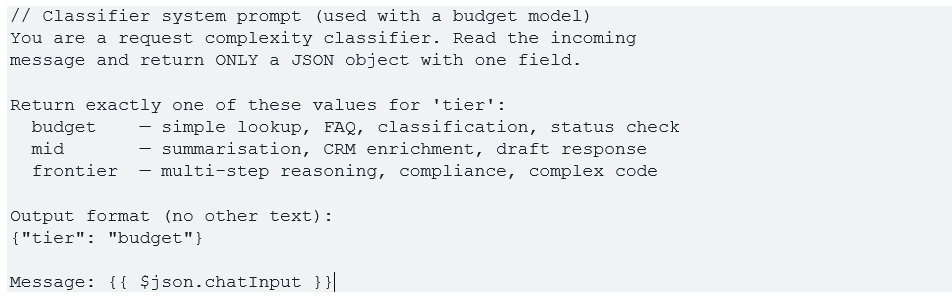
The implementation has three parts: a classifier that assigns each incoming request to a tier, a Switch node that directs traffic based on that classification, and separate AI Agent or Basic LLM nodes for each tier with the appropriate model connected.
The classifier node
The classifier is a lightweight LLM call that reads the incoming message and returns one of three values: budget, mid, or frontier. Use the cheapest capable model for this step, since the classifier itself must not become a cost centre. Claude Haiku 4.5 or GPT-4.1 Nano work well here because they follow simple JSON output instructions reliably.
The Switch node
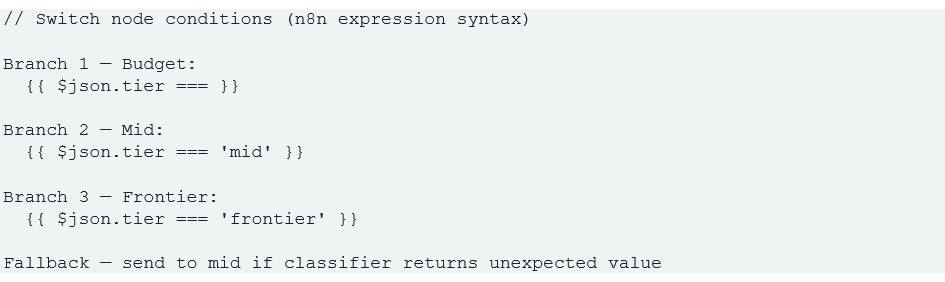
Connect the classifier output to a Switch node. Create three output branches keyed to the tier field value from the JSON response: one branch for budget, one for mid, one for frontier. Each branch connects to a separate AI Agent node or LLM node configured with the appropriate model.
The Switch node in n8n evaluates conditions against the incoming data. Set the condition on each branch to evaluate the tier field from the parsed classifier JSON. If the classifier returns an invalid tier for any reason, add a fallback branch that routes to the mid tier by default so no request drops silently.
Model assignment per branch
- Budget branch: Claude Haiku 4.5 ($1.00 input / $5.00 output per million tokens) or GPT-4.1 Nano ($0.10 / $0.40). Enable prompt caching on the system prompt node if the same system prompt runs on every budget request.
- Mid branch: GPT-4.1 Mini ($0.40 / $1.60) or Gemini 2.5 Flash ($0.15 / $0.60). Either works well for summarisation and CRM tasks; choose based on your existing provider relationships and latency requirements.
- Frontier branch: Claude Opus 4.6 ($5.00 / $25.00) or GPT-4.1 ($2.00 / $8.00). Reserve this branch only for the task classes identified in your routing framework where frontier accuracy is genuinely necessary.
Important: classify with context, not just query length. Query length is a tempting proxy for complexity but a poor one. A three-word query that says ‘Explain GDPR liability’ is a frontier task. A 200-word query asking to confirm a delivery date is a budget task. The classifier prompt should teach the model to identify intent and domain sensitivity, not count words.
04 What the Numbers Actually Look Like at Scale
The savings from tiered routing are not theoretical. Research from teams running this in production in 2026 shows a consistent pattern: approximately 70 percent of queries in a typical support or information-retrieval system can be handled by a budget model, 20 percent need the mid tier, and 10 percent genuinely require a frontier model.
Running those ratios through the mid-2026 pricing gives a concrete comparison. If your system processes 1,000,000 queries per month at an average of 500 input tokens and 200 output tokens per query, the cost difference between routing everything through Claude Sonnet 4.6 versus applying tiered routing works out roughly as follows:
Single-model approach (Claude Sonnet 4.6 for all queries): 500M input tokens at $3.00 per million = $1,500. 200M output tokens at $15.00 per million = $3,000. Monthly total: $4,500.
Tiered routing approach (70% budget, 20% mid, 10% frontier): Budget queries (700K): Claude Haiku 4.5 at $1.00/$5.00. Roughly $350 input, $700 output. Mid queries (200K): GPT-4.1 Mini at $0.40/$1.60. Roughly $40 input, $64 output. Frontier queries (100K): Claude Opus 4.6 at $5.00/$25.00. Roughly $250 input, $500 output. Monthly total: approximately $1,904. Saving versus single-model: $2,596 per month, or roughly 58 percent.
Add prompt caching on the budget and mid tier system prompts and the effective cost drops further, typically by an additional 20 to 30 percent on the cached input portion. Apply the Batch API for overnight or non-latency-sensitive tasks in the frontier tier and the expensive frontier calls drop by 50 percent. Combined, it is entirely realistic for a team making no changes to their models or their output quality to reduce their monthly LLM bill by 70 to 80 percent through routing and caching alone.
A startup-scale example that appears repeatedly in 2026 LLMOps discussions: a team running a customer support chatbot entirely on GPT-4o at roughly $3,000 per month switched to a tiered system with Haiku 4.5 handling the majority of queries. Their equivalent monthly cost dropped to under $400 while customers reported no change in response quality on routine queries. The budget they freed up went back into the product.
05 Tracking and Tuning Your Routing Layer
A routing layer that is not monitored drifts. The classifier makes wrong calls on edge cases. Task types you assumed were budget-appropriate turn out to have a higher failure rate than expected. The frontier tier gets used more than your model predicted because the classifier is too conservative.
Three monitoring practices that make a genuine difference:
Tag every LLM call
Log the tier assignment, the model used, the token count, the cost, and a customer or workflow identifier on every single request. Most teams know their total monthly LLM bill. Very few know which feature, which user segment, or which workflow is driving it. Without per-call tagging, you cannot identify the 20 percent of traffic that is responsible for 80 percent of the cost. This is exactly the kind of structured data that feeds well into Microsoft Power BI dashboards or any BI layer for operational cost visibility.
Track tier escalation rate
The percentage of queries where the classifier assigns frontier tier is the most important number to watch in the first 30 days after launch. If it climbs above 15 percent of total traffic, your classifier is being too conservative, or your task distribution is genuinely more complex than you modelled. Either finding leads to a specific action: prompt adjustment on the classifier, or task redesign on the workflows that keep landing in the expensive tier.
Monitor budget tier failure rate
If budget-tier responses are being rejected by users, generating callbacks, or being re-submitted with the same question, that is a signal the model is failing on a task class that should be escalated. Set a threshold and review weekly. If more than 8 to 10 percent of budget-tier conversations end without a resolution, the routing decision for that intent category needs to move up a tier.
The 80/20 principle applies here too: In most production systems, 20 percent of task types drive 80 percent of LLM cost. Identify those task types by tagging and logging from day one. Once identified, they are almost always eligible for routing optimisation, prompt compression, or caching improvements that do not touch the other 80 percent of the system at all.
Where Teams Go Wrong (and How to Avoid It)
The most common mistake in implementing tiered routing is treating the budget tier as a single quality level. Different budget models have genuinely different strengths. Claude Haiku 4.5 follows complex instructions more reliably than GPT-4.1 Nano but costs ten times more per million input tokens. GPT-4.1 Nano handles simple extraction tasks well but degrades faster on longer inputs. The right budget model depends on your specific task mix, and it is worth running your own benchmarks on your own prompts rather than relying on headline comparisons.
The second mistake is building the routing layer after the rest of the system. Retrofitting routing into a pipeline that was designed around one model creates awkward architectural seams and edge cases that are hard to test cleanly. Build the Switch node and the classifier into the architecture from the first version, even if you initially route all traffic to one model. Adding the tier branches later is easy when the structure is already there.
The third mistake is not planning for reasoning model token costs. OpenAI’s o3 and similar reasoning models generate internal thinking tokens that are charged at output rates. A single complex o3 call can consume tens of thousands of output tokens before producing the visible answer. If you use reasoning models in your frontier tier, always cap max output tokens and prefer batched inference for non-interactive workloads. The Batch API’s 50 percent discount applies to these models too.
MageBytes builds custom AI automation systems for enterprise and mid-market businesses across India and internationally, including cost-optimised agentic architectures with tiered routing built in from the start. If your current AI spend is growing faster than your user base, or you are planning a new AI deployment and want the cost structure designed correctly before you write the first line of code, reach the team through our contact page and describe what you are building. We will give you a straight assessment of what the right model mix and routing approach looks like for your workload.
Spending Too Much on LLMs? Let’s Fix the Architecture. MageBytes designs tiered AI systems that cut LLM spend by up to 80% without dropping quality. Talk to our team.