A client called us last month with a simple-sounding question: “Should we go all-in on Dynamics 365 with Copilot, or just keep building on n8n?” Twenty minutes into the conversation it was clear the real question wasn’t Microsoft versus open-source at all. It was: what does this business actually need in the next two years, and which tool gets them there without paying for capacity they’ll never touch?
That’s the question this piece is built around. Not a spec sheet, not a vendor comparison table where the pricier option conveniently wins every row. A practical read on when an enterprise platform earns its keep and when it’s the wrong tool for a job that a lighter setup would have solved in a fraction of the time.
If you’re weighing this decision right now and want a second opinion that isn’t selling you anything by default, talk to our CRM and automation consulting team before you sign anything. It’s a much cheaper conversation to have before implementation than after.
Let’s Define the Actual Comparison
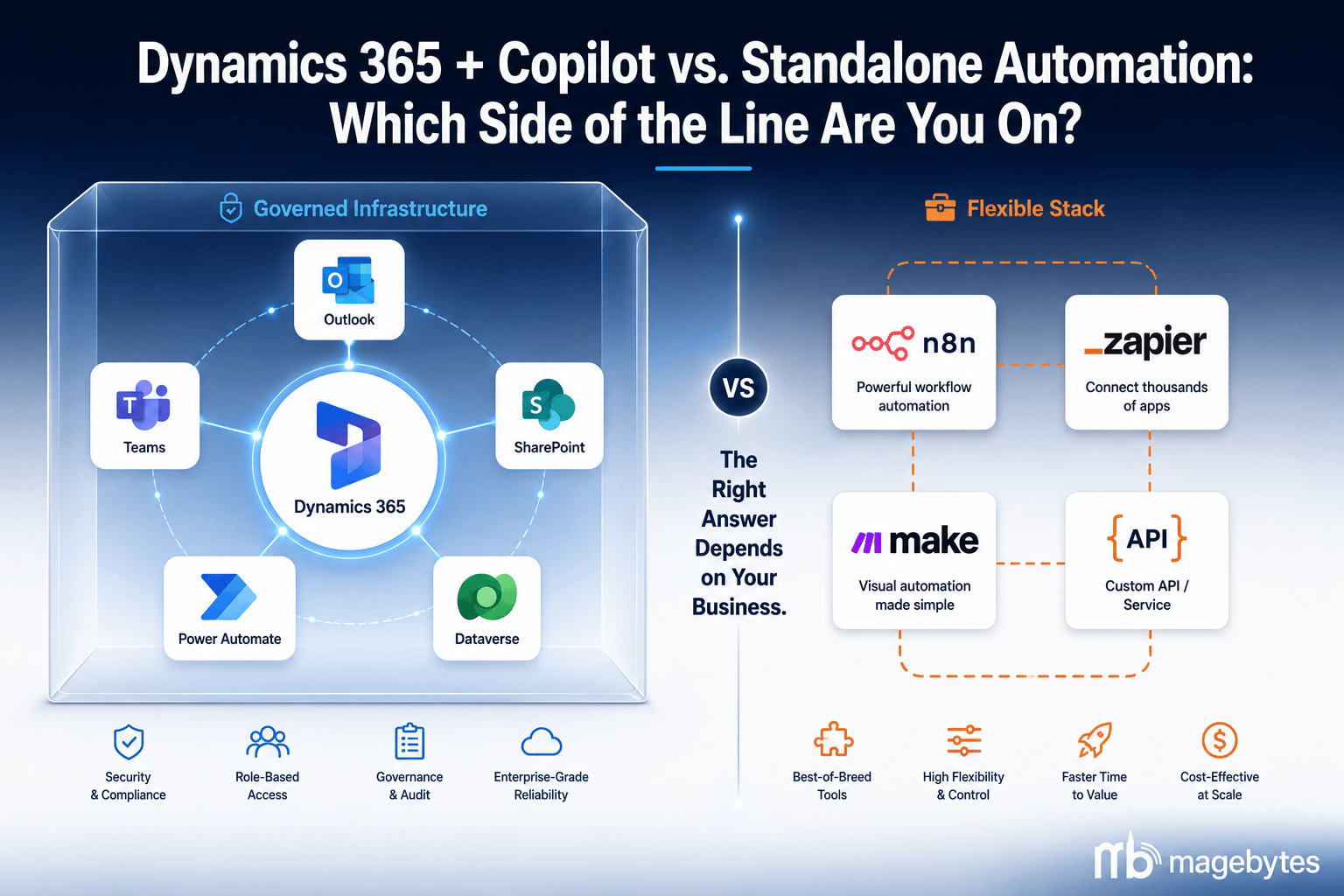
Dynamics 365 isn’t a single product — it’s a family of business applications (Sales, Customer Service, Finance, Supply Chain, Field Service, Business Central, Commerce) sitting on a shared data layer called Dataverse, wired natively into Outlook, Teams, and SharePoint.
Copilot inside that ecosystem comes in layers, and pricing hasn’t stood still. The productivity layer — Copilot in Word, Excel, Outlook, Teams — runs through the Microsoft 365 Copilot add-on, published at $30 per user per month for enterprise tenants. Volume discounts on that add-on were set to expire June 30, 2026, and Microsoft’s base Microsoft 365 suite prices (Business Standard, E3, E5) stepped up on July 1, 2026, so the all-in per-seat number is higher this quarter than it was in spring.
For organizations further down the AI-governance path, Microsoft rolled the Microsoft 365 E7 Frontier Suite to general availability on May 1, 2026, at $99 per user per month, bundling Agent 365 — a control plane for discovering and governing AI agents — on top of Copilot. That’s a meaningful jump for most mid-market teams and is really aimed at organizations already running Copilot at scale that need central governance, not a starting point.
On the other side sits a much wider field than most Dynamics-vs-automation articles admit. n8n workflow automation services cover open-source, self-hostable builds that handle complex multi-step logic at close to zero infrastructure cost. Zapier and Make serve simpler trigger-action needs for non-technical teams. Custom API work covers the rest. And — this is the part most comparisons skip — Salesforce CRM consulting, Zoho CRM customization, and Odoo ERP implementation are full enterprise-grade CRM/ERP platforms in their own right, not lightweight alternatives.
Most of the time a client asks us ‘Dynamics 365 or a workflow tool,’ what they mean is Dynamics 365 versus a different platform plus some automation layered on. That’s a different question, and it usually has a different answer than the one they walked in expecting.
When Dynamics 365 and Copilot Earn the Price Tag
Your business already lives in Microsoft’s world
This is the strongest reason to go this route, and it gets undersold. If your team already works inside Teams, SharePoint, and Outlook, the Copilot integration depth is real, not marketing copy. Microsoft’s April 2026 rollout of Work IQ gave agents a shared context layer across the whole Microsoft 365 tenant — meeting notes, email history, calendar, and CRM records all reachable from one semantic index, with agent-to-agent handoffs now live. A sales call wraps and the CRM record, the follow-up tasks, and the meeting summary are already connected, no one copying anything by hand.
If you’re already on Dynamics 365 and want to know whether the current Work IQ and Copilot Studio updates change your ROI math, our Dynamics 365 implementation and Copilot consulting team can walk your specific tenant against the roadmap rather than the generic feature list.
Compliance isn’t optional in your industry
Financial services, healthcare, legal, government — these sectors carry audit, retention, and data residency obligations most standalone stacks don’t meet out of the box. Dynamics 365 inherits Microsoft’s SOC 2 Type II, ISO 27001, and GDPR certifications, and Microsoft Purview logs Copilot interactions and agent actions, including session replay. When an auditor asks who touched what and when, that answer already exists in the platform rather than something your team had to build and maintain.
That’s a real advantage in a regulated industry. It’s not a reason for a standard B2B services company with no sector-specific mandate to pay the enterprise premium — that business can build equivalent basic governance on a lighter stack for a lot less.
The workflow genuinely crosses multiple departments
Because Sales, Finance, Field Service, and Customer Service all sit on Dataverse, a deal closing in Sales can update Finance forecasting and trigger a Field Service work order without a single custom integration. Stitching that together across separate standalone tools means building and maintaining several API bridges, each one a place things can quietly break.
If your roadmap genuinely spans three or more of these functions with shared data needs, that native connectivity is worth paying for. If it’s really two systems that need to talk to each other, it’s overkill.
What it costs, honestly
Run the numbers for a 100-person team on Dynamics 365 Sales Enterprise with the Copilot add-on at current post-July-2026 pricing and you’re looking at roughly $200 to $220 per user per month depending on your agreement terms and whether you’re on the standard add-on or an E7-tier bundle — call it $240,000 to $260,000 a year in licensing before implementation and training.
If it’s buying unified cross-department data, built-in compliance infrastructure, and deep Microsoft 365 integration for a team already committed to that stack, it usually does. If it’s buying a CRM and a handful of automations for a company that could hit 80% of the same outcome on Zoho at a quarter of the price, it doesn’t.
When Standalone Tools Are the Smarter Call
This case has gotten stronger over the last two years as standalone tools matured, and it deserves more weight than most vendor-funded comparisons give it.
Speed to value is a real number, not a soft benefit
A focused Dynamics 365 Sales and Customer Service rollout with data migration and Copilot configuration typically runs three to six months before a team is fully productive — longer if incoming data is messy, which it usually is. An custom n8n automation build handling the same pain point can be live within a week or two. If a specific operational problem is costing the business money every single day it stays unsolved, that speed difference is worth real money on its own.
Most companies don’t run on Microsoft alone
The Microsoft-everywhere assumption behind most Dynamics 365 pitches doesn’t match how a lot of growing companies actually operate. Salesforce CRM integration services, Stripe for billing, an AWS-hosted product, Slack for internal comms, Jira for engineering — that’s an entirely normal SaaS stack in 2026, and Dynamics 365’s integration depth doesn’t help there, because what it integrates deeply with is mostly other Microsoft products. For a mixed stack like that, Salesforce with its own automation layer, or a custom n8n integration between the actual tools in use, is a better structural fit than adopting a Microsoft platform and then spending the next year building bridges back out to everything you already run.
Not every automation need is a platform-scale problem
Some requirements are narrow and unlikely to grow: sync orders between the storefront and the accounting system, post a Slack alert on a new support ticket, email a daily ops report off a database query. Buying an enterprise suite to solve any one of these is disproportionate — you’re licensing a full platform’s worth of capability to run a handful of triggers, and the ongoing license administration and governance overhead isn’t free. It shows up later as IT time and unnecessary process weight.
The other enterprise platforms deserve their own seat at the table
Zoho CRM customization services with Zia AI and Zoho Flow covers most mid-market sales and service automation needs at a fraction of Dynamics 365’s cost. Odoo ERP implementation for mid-market businesses is a genuine open-source competitor to Business Central for SMB and mid-market ERP without a Microsoft licensing commitment. If what you actually need is an integrated business platform with built-in AI, the real comparison isn’t Dynamics 365 versus a workflow tool — it’s Dynamics 365 versus a different platform that covers the same ground on a different cost curve, and that comparison deserves the same rigor as the Microsoft-versus-n8n one.
More than once, a client has opened the conversation asking us to pick between Dynamics 365 and n8n, and the answer that actually fit their business was Zoho CRM — a platform they hadn’t put on the list at all. Neither of the original two options was wrong. There was just a better-fitting third one on the table.
Five Questions Worth More Than Any Feature Chart
1. Where does your data physically live today?
If the systems you need automated are already Dynamics 365, SharePoint, Teams, and Outlook, staying inside that ecosystem plays to its strength — the automation runs where the data already is. If it’s Salesforce, a custom Postgres database, Stripe, and Intercom, you’re building integrations out to reach them from Dynamics 365 either way, which erodes most of the native-integration case you’d be paying for.
2. Who owns this system in a year?
Dynamics 365 wants either an internal Microsoft-certified admin or an ongoing partner relationship. A custom n8n build wants a developer who owns it. Neither is maintenance-free, and neither should be sold as set-and-forget. Pick the option your team can realistically staff — this question alone eliminates more bad choices than a feature comparison ever will.
3. Is your compliance load standard, or sector-specific?
Standard business data protection is handled well by either path. Healthcare, finance, legal, or government with explicit audit and residency requirements is a different story — the built-in Microsoft compliance stack is a genuine advantage there, and rebuilding it equivalently on a standalone stack is a real, ongoing cost.
4. Are you migrating off something or building net-new?
Migration cost rarely shows up in a vendor pitch but almost always shows up in the final invoice. Moving off Zoho CRM or Odoo ERP onto Dynamics 365 is a genuine project — data transformation, retraining, disruption to live workflows. Building net-new for a process with no existing system is a cleaner comparison. If you’re replacing a system that already works, price in the switching cost honestly before you decide.
5. How wide is the automation roadmap, really?
One workflow doesn’t justify a platform decision. Sales automation plus finance workflow plus service AI plus field operations plus cross-functional reporting over the next 24 months does, because a shared data model compounds in value as the number of connected processes grows. Weigh the platform decision against the two-year roadmap, not this quarter’s single request.
Most Serious Teams End Up Running Both
Here’s what the tidy either/or framing usually leaves out: most organizations with real automation ambition land on a layered setup that uses an enterprise platform for some things and standalone tools for others, because no single platform covers every use case at every price point well.
A pattern we build often: Dynamics 365 Sales and Customer Service handle the core CRM and service motion, with Copilot embedded across both. Power Automate covers the simple trigger-action work that stays inside the Microsoft boundary. An n8n automation layer picks up external integrations where there’s no native Dynamics connector, where the logic needs real orchestration, or where the workflow reaches outside Microsoft’s boundary entirely. Power BI reporting and dashboards sits on top, giving one view across all of it.
That’s not a compromise — it’s the sensible architecture for a business that’s honest about what each layer is actually doing well. The same logic holds on the ERP side: Dynamics 365 Finance and Supply Chain suits large, multi-entity enterprises with complex global operations; Odoo suits most mid-market businesses that want integrated ERP without the enterprise licensing load. They’re not really competing for the same buyer.
Worth saying plainly: rule-based automation is deterministic — condition X triggers action Y, every time, auditable after the fact. Copilot-style AI automation is probabilistic — the output is generated from context and pattern, not a fixed rule. Both belong in a modern stack. But compliance-critical and safety-critical workflows should stay deterministic regardless of which platform runs them. Swapping a hard-coded approval step for an AI agent that generates the outcome is a governance decision, and it should be made on purpose, not inherited by default.
Where This Actually Lands
Dynamics 365 with Copilot earns its cost when a business is already committed to the Microsoft stack and isn’t planning to change that, when compliance requirements favor a pre-certified enterprise platform, and when the automation roadmap genuinely spans multiple departments that benefit from one shared data model.
Standalone tools win when the stack is multi-vendor, when the automation need is narrow and well-defined, when speed matters more than breadth, or when the enterprise platform’s licensing cost doesn’t return proportionate value at the business’s current scale.
The second worst is treating it as permanent. Most businesses we’ve worked with have changed their automation architecture at least once as they grew. Starting with the tool that fits your current scale, and moving up when the business genuinely outgrows it, beats buying enterprise capability speculatively and paying for headroom you’re not using yet.
MageBytes implements Dynamics 365 and Copilot Studio for enterprise clients, builds n8n and custom automation for clients where that’s the better fit, and delivers Salesforce, Zoho CRM, Odoo ERP, and ServiceNow ITOM development for clients whose needs sit outside the Microsoft stack. We don’t have a stake in which one you pick — we just want it to be the right one for your business. Start that conversation here.
Still Weighing Dynamics 365 Against a Lighter Stack? We’ll assess your actual systems, your team’s capacity, and your two-year roadmap — vendor-neutral, no platform bias. Book a free strategy call.