Automating Orders, Inventory and Customer Data
Here is a situation that comes up more often than it should. A business runs a decent ecommerce operation on Shopify or Magento, processes a few hundred orders a day, and has been using Dynamics 365 for finance and operations for a couple of years. The two systems work fine on their own. The problem is the gap between them.
Someone on the operations team exports orders from the store every morning, reformats the file, and imports them into Dynamics. Someone else logs into both systems to check whether an inventory count in one matches the other. The customer who called about their order exists as a Shopify customer record and separately as a Dynamics contact, with slightly different address formats and no shared history between them. The finance team reconciles at month end and finds discrepancies that take days to trace.
None of this is unusual. Most of it is unnecessary.
Connecting Dynamics 365 to an ecommerce store properly, so that orders flow automatically, inventory stays accurate across both systems in near real-time, and customer data stops living in two separate silos, is one of the cleaner wins available to a growing ecommerce business. MageBytes has built this connection for Magento, Shopify, WooCommerce, and BigCommerce stores. This blog covers how the integration actually works, where implementations typically go wrong, and which approach makes sense depending on your platform and your volume.
The Three Data Flows That Actually Matter
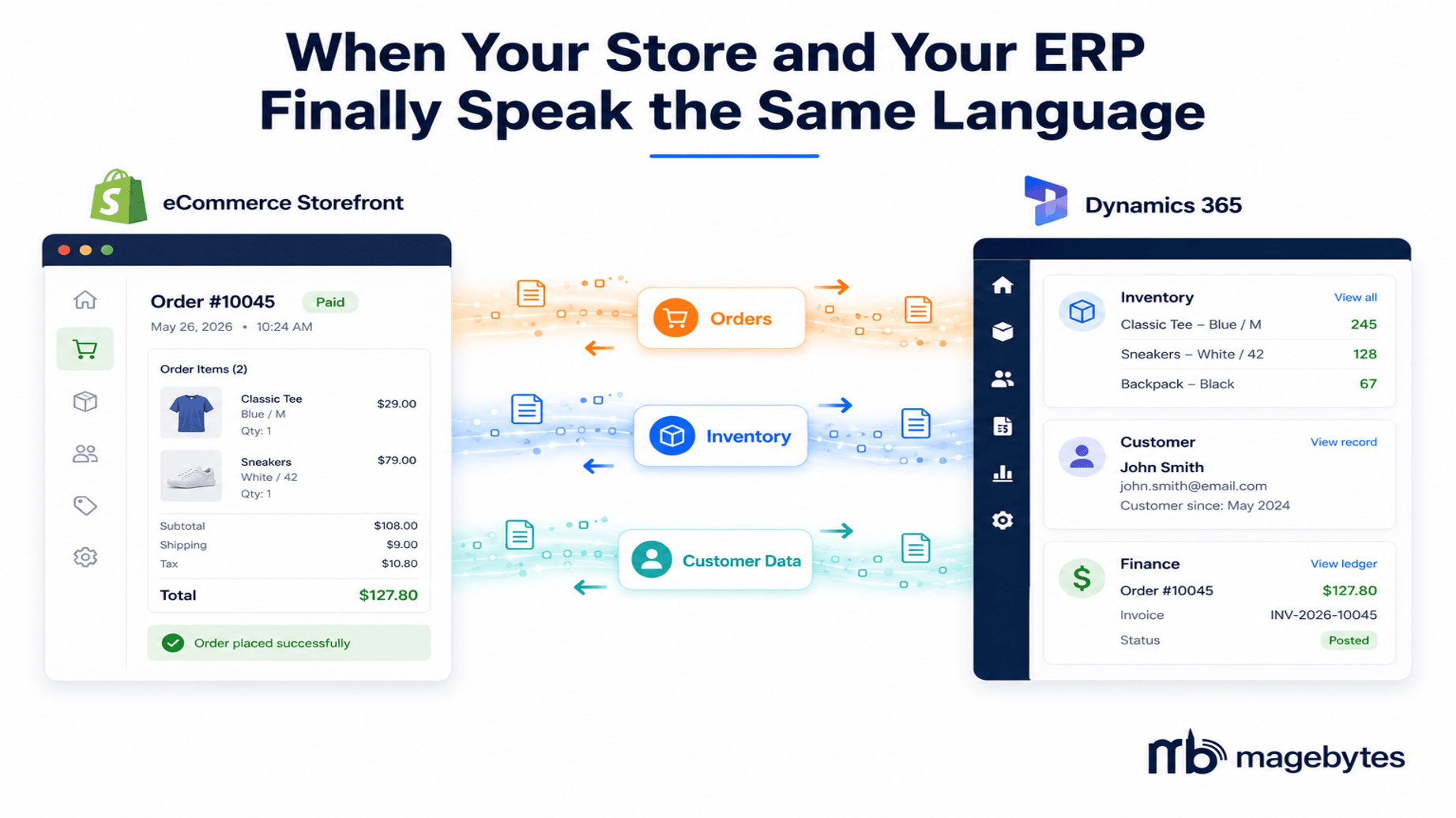
Every Dynamics 365 and ecommerce integration ultimately comes down to three data flows: orders, inventory, and customers. They sound simple. The detail inside each one is where complexity lives.
Orders: From storefront to ERP without anyone touching a keyboard
When a customer completes checkout on your store, a series of things need to happen inside Dynamics 365 before that order is considered properly entered into your business system. A sales order record needs to be created with the correct line items, quantities, and pricing. The customer account needs to be matched or created. Payment information needs to be recorded. Tax needs to be applied correctly based on the shipping destination and your tax configuration.
In a manual process, someone looks at the Shopify or Magento order and enters this information. Even at 100 orders per day, that is 3 to 5 hours of data entry. At 400 orders per day, it is a full-time job for two people, and it still has errors.
The automated version fires the moment an order is placed on the store. A webhook or a polling mechanism picks up the new order, maps the line items to the corresponding Dynamics 365 product records using SKU matching, creates the sales order, and posts it into the correct journal. For Shopify and Dynamics 365 Business Central specifically, Microsoft built a native connector that is included free with any Business Central SaaS subscription. As of April 2026 Wave 1, that connector also handles custom Shopify collections and multi-currency presentment, meaning stores selling in multiple currencies get their financial documents created in the currency the customer actually paid in, not just the store’s base currency. That particular update eliminated a painful manual reconciliation step for a lot of international stores.
For Dynamics 365 Finance and Operations, which is the enterprise tier rather than Business Central, the native connector does not exist. Integration requires either a purpose-built middleware connector, an iPaaS platform like Celigo or MuleSoft, or custom API development. The right choice depends on order complexity. Standard DTC orders with simple product structures work fine on most middleware solutions. Configurable products, split shipments from multiple warehouses, or complex B2B pricing tiers almost always need a purpose-built or custom solution.
The most common order integration failure mode is not a technical one. It is a data mismatch. SKUs in the ecommerce store that do not match the item numbers in Dynamics 365, customer records with inconsistent address formatting, product configurations in the store that have no equivalent in the ERP. The integration itself is often straightforward. Getting both systems to the same data standard before connecting them is where most implementations find their work.
Inventory: The sync that has to work in near real-time
Inventory sync is the highest-stakes data flow of the three. A pricing mismatch creates a customer service issue. An inventory mismatch creates an oversell: you take money from a customer for a product that is not actually in stock, and now you have a fulfilment problem and a refund to process.
The sync needs to propagate in near real-time, meaning within seconds or at most a few minutes, not overnight or every few hours. A busy store processing 500 orders per day shifts inventory continuously throughout the day. A batch sync that runs every four hours leaves a window where any highly popular SKU could be oversold multiple times.
What the inventory sync covers: stock level adjustments in Dynamics 365 flowing to the ecommerce store as available quantity updates, stock adjustments in the store (returns received, manual corrections) flowing back to Dynamics, and, for businesses with multiple warehouse locations, location-specific inventory counts rather than a single aggregated total. That last point matters for order routing. If your store is supposed to fulfil from the warehouse closest to the customer, knowing that London has 3 units and Manchester has 47 is operationally different from knowing you have 50 units nationally.
For Magento and Adobe Commerce specifically, the inventory sync via the REST API or GraphQL is reliable and well-documented. The challenge for stores with large catalogues is the volume of API calls during busy periods. A sale event generating 2,000 orders in an hour produces 2,000 inventory decrement events that need to propagate. The integration architecture needs to be built to handle that burst without queuing delays long enough to cause oversells.
Customer data: One record, two systems, no duplicates
Customer data is the integration layer that gets least attention and causes the most downstream problems when it is wrong.
A customer who places their first order on your Shopify store exists in Shopify as a customer record. They also need to exist in Dynamics 365 Sales or Customer Service as a contact or account, and in Dynamics 365 Finance as a customer ledger entry. These three records should be the same entity with the same address, the same contact details, and a shared purchase history. In most stores that have not built this integration, they are three separate records that drift apart over time.
The integration maps a Shopify or Magento customer to a Dynamics 365 contact on their first order. On subsequent orders, it matches the existing record rather than creating a duplicate. Address updates in one system should propagate to the other. Purchase history from the ecommerce store should be visible in the CRM record so that customer service teams can see what someone has bought, when, and in what amount, without switching between two systems.
For B2B stores where customers buy on account terms, this integration is even more critical. A Dynamics 365 customer record for a B2B buyer includes their credit limit, their payment terms, and any outstanding balances. The ecommerce store needs to check against that record before accepting an order on account. If a business customer is over their credit limit in Dynamics, the store should not let them add more orders on account until the balance is cleared. That logic requires a live connection, not a daily sync. Building it well for B2B commerce scenarios is one of the more complex parts of this integration but also one of the highest-value ones for businesses that extend credit terms to trade customers.
Which Integration Approach Actually Fits
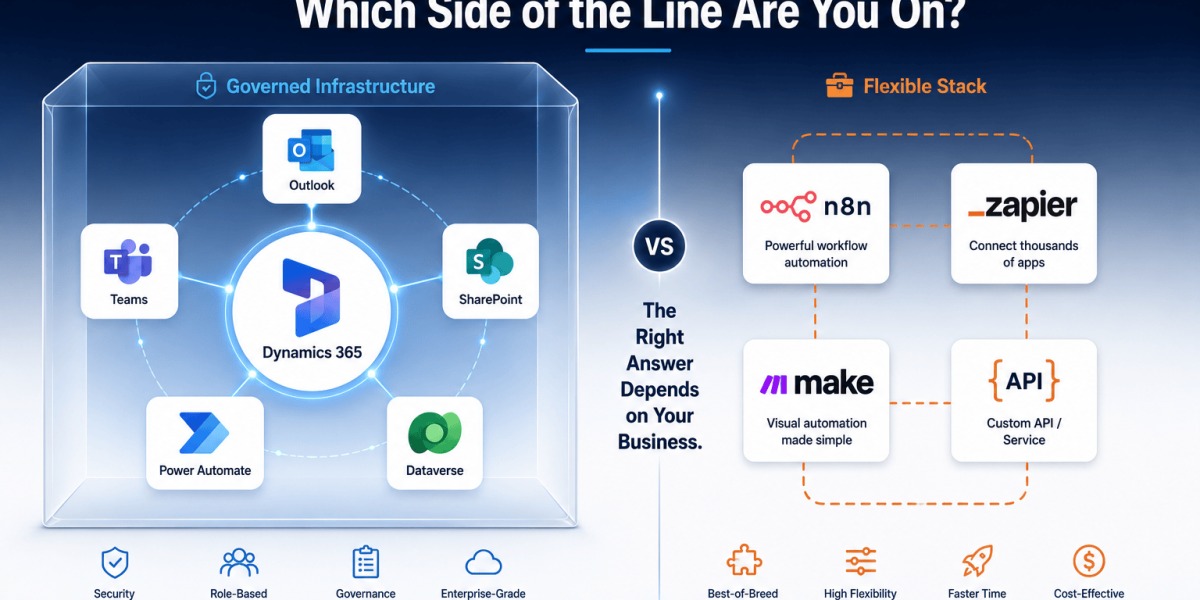
There is no universal answer here and anyone who tells you there is has not implemented enough of these to know the edge cases. The right approach depends on your Dynamics 365 tier, your ecommerce platform, your order volume, and the complexity of your product and pricing structure.
1. Native Business Central connector for Shopify
If you are on Dynamics 365 Business Central and your store is on Shopify, this is the first option to evaluate. Microsoft’s native connector, free with any Business Central SaaS subscription, covers order import, inventory sync, product catalogue sync (BC to Shopify direction), customer creation, and payment handling. The 2026 Wave 1 update added multi-currency support, improved B2B order import, and expanded custom collection support. For a straightforward DTC Shopify store with a standard product range and no complex pricing logic, this connector handles the core flows well. Setup takes a few days. Maintenance is low because Microsoft updates the connector alongside Business Central.
Where it runs out of road: B2B operations with tiered contract pricing, multi-warehouse routing logic, stores with complex product configurations like configurable items or bundles with component-level inventory, or high-volume operations where the connector’s sync frequency is not fast enough during peak periods. For those scenarios, the native connector is a reasonable starting point but not a permanent solution.
2. Purpose-built middleware connectors
Purpose-built connectors for specific platform combinations, Shopify to Dynamics 365 F&O, Magento to Business Central, WooCommerce to Dynamics, sit between the two systems and handle the data transformation, field mapping, and error handling that generic integration tools do not do out of the box.
These typically cover 100 or more integration touchpoints and handle scenarios the native connector does not: split shipments, partial fulfilments, complex tax scenarios, B2B pricing tiers, and real-time inventory calls during checkout. Implementation timelines are shorter than custom development, often two to four weeks for a standard configuration, and the pre-built mappings reduce the risk of field-level data errors.
The cost sits above the native connector but below a fully custom build. The trade-off is configurability. If your business has unusual data structures or highly specific workflow requirements, a pre-built connector still requires customisation work and the connectors vary significantly in how much flexibility they actually allow.
3. Custom API integration
For businesses with requirements that no pre-built connector handles cleanly, a custom integration built against the Dynamics 365 API and the ecommerce platform’s API, whether that is Shopify’s GraphQL Storefront and Admin API, Magento’s REST or GraphQL API, or BigCommerce’s native headless API, is the right answer. The development time is longer, typically six to twelve weeks for a production-grade build with proper error handling, retry logic, and monitoring. The result is an integration that does exactly what your business needs rather than approximating it.
Custom builds also give you full ownership of the logic. When your business processes change, when pricing rules shift, when you add a new fulfilment centre, the integration can be updated without waiting for a connector vendor to release a new feature. For high-growth businesses where the requirements are moving quickly, that flexibility has real operational value.
One thing worth being explicit about before any integration project starts: the quality of the integration is limited by the quality of the data in both systems. If Dynamics 365 has customer records with inconsistent formatting, or if the ecommerce store has product SKUs that do not match the ERP item numbers, those problems need to be fixed before the integration goes live. An automated sync that copies bad data from one system to another copies it thousands of times per day. The cleanup after a poorly prepared integration launch takes significantly longer than the integration build itself.
What Actually Breaks in Production
Every integration works in the test environment. The failures appear in production, usually under three conditions: higher volume than testing accounted for, edge-case data that testing did not cover, and system updates from either the ecommerce platform or Dynamics that change an API behaviour without enough notice.
SKU mapping failures
The most common production failure. An order comes in for a product variant that has a SKU in Shopify that does not match any item number in Dynamics 365. The integration does not know what to do with it and either errors out or creates a line item with a blank product reference. This happens with new products added to the store without updating the Dynamics product catalogue, with bundles and kits that have their own SKU in the store but are represented as component-level items in the ERP, and with size and colour variants that the store treats as child SKUs but the ERP treats as separate items.
Fix it by building a SKU validation step into the integration that checks the product reference before creating the sales order, and surfaces any unrecognised SKUs to the operations team in a daily report rather than silently failing.
API version mismatches after platform updates
Shopify and Magento both update their APIs on regular release cadences, and old API versions are deprecated on defined timelines. The Business Central Shopify connector uses Shopify’s GraphQL Admin API at a version that aligns with Business Central’s own release cycle. When a Business Central update is delayed, the connector can be running against a Shopify API version that is approaching its end-of-support date. This is not theoretical: Microsoft’s own documentation notes that the connector released in April 2025 uses API version 2025-01, which is supported until January 2026. Staying on a supported Business Central release is therefore not optional if you want the connector to keep working.
Inventory count timing
A store processing 500 orders per day during a flash sale can generate more inventory decrement events in one hour than the integration was designed to handle in a day. If the integration queues events rather than processing them in real-time, the inventory in the store can lag behind the actual stock level in Dynamics by dozens of units during the peak, opening a window for oversells.
Build load testing into the integration validation process using your realistic peak order volume, not your average daily volume. A flash sale or a Diwali sale peak can be three to five times normal volume. Test at that level before going live and confirm the inventory sync keeps up.
Customer matching logic producing duplicates
Guest checkout orders create customer records with an email address but no existing Dynamics account. A returning customer who previously used a different email address at checkout will not match their existing record. A B2B customer who orders through a portal using their company email and through the DTC store using a personal email exists in both systems as separate entities. Customer de-duplication rules need to be defined before the integration is built, not after. Retroactively merging duplicate CRM records is a painful job.
What the Business Looks Like After Integration
This part is worth being concrete about because the operational changes are real and the financial impact is measurable.
The operations team that previously spent three hours per day importing orders into Dynamics spends zero. That time goes somewhere else. The inventory manager who checked stock counts in two systems every morning to catch discrepancies stops doing it because there are no discrepancies to catch. The customer service representative who needed to open Shopify in one tab and Dynamics in another to answer a question about a customer’s purchase history can see everything in a single CRM record.
On the finance side, month-end reconciliation between the store’s revenue records and the Dynamics 365 finance ledger goes from a three-day process to a confirmation step. Every order that went through the store is already in the ERP. Every payment is already recorded. Every returned item has already been processed. The Microsoft Power BI dashboards that management uses for commercial reporting pull from the same Dataverse that the integration feeds into, so the revenue and order data the CEO sees on Monday morning is the same data the operations team worked from on Sunday. There is no longer a version of the truth; there is just the truth.
For stores that run both a B2C ecommerce channel and a B2B trade account channel, the integration makes the combined view of a customer’s total spend visible for the first time. A trade customer who also buys retail through the store shows a complete purchase history across both channels in a single Dynamics 365 record. That is commercially useful information for account managers and for pricing decisions.
A fashion brand processing 300 orders per day cut their order processing cost by roughly 65 percent after connecting their Shopify Plus store to Dynamics 365 Business Central. The headcount that had been handling manual order entry was redeployed to customer experience work. The inventory discrepancies that used to surface at month end dropped to near zero in the first month after go-live. That is not an exceptional outcome. It is what a well-built integration looks like in practice.
The Questions to Answer Before Starting
There is a short list of things that need to be settled before any integration project begins. Skipping them creates problems six weeks into a build that would have taken two days to resolve at the start.
- Which Dynamics 365 tier are you on? Business Central and Finance and Operations are different products with different APIs and different native connector options. The integration approach differs significantly between them.
- What is the source of truth for each data type? Products and pricing should originate in Dynamics and flow to the store, or the other way around. Pick one direction per data type and stick to it. Bi-directional writes on the same field without a conflict resolution rule create update loops.
- What are your realistic peak volumes? Not average volumes. The peak. The number of orders per hour on your busiest day. Design the integration to handle that, not to handle a normal Tuesday.
- How are your customers identified across systems? By email? By account number? By a combination? Define the matching logic before the build. Retrofitting it after duplicate records exist in both systems is significantly harder.
- Do you have complex pricing or product structures? Configurable products, bundled items, B2B tiered pricing, contract-specific pricing. Any of these changes the complexity of the order line item mapping and may rule out the native connector as a sufficient solution.
If you are unsure about any of these, that is a reasonable place to start a conversation. MageBytes has run these scoping exercises for ecommerce integration projects across multiple Dynamics 365 tiers and multiple storefront platforms, and the scoping process is where most of the real project risk gets identified and dealt with before it becomes expensive.
The Short Version
Connecting Dynamics 365 to an ecommerce store is not a glamorous project. It does not ship a new feature. Customers do not see it. The website does not look different.
But it removes a category of operational friction that compounds every day it is not there.
Every order that does not need to be manually entered. Every inventory count that does not need to be manually reconciled. Every customer record that exists once instead of twice. These are all things that save time, reduce errors, and make the business easier to run at the scale it is growing toward.
MageBytes builds these integrations for Magento and Adobe Commerce, Shopify and Shopify Plus, WooCommerce, and BigCommerce stores, across Business Central and Dynamics 365 Finance and Operations. We scope the project before we start building it, so the things that break in production get identified before they are in production. Start the conversation here.
Ready to Connect Your Store and Your ERP? MageBytes integrates Dynamics 365 with Shopify, Magento, WooCommerce and BigCommerce stores. We handle the scoping, the build, and the production go-live. Talk to our integration team.