5 Business Processes You Can Now Automate
Most automation conversations over the past few years have come with a quiet asterisk attached. Yes, you can automate a process, but only if the system you are automating has a clean API. Only if the vendor portal exposes the right endpoints. Only if the legacy application your finance team has used for fifteen years was ever designed with integration in mind.
For a huge number of real business workflows, that asterisk has been a dealbreaker. The vendor portal where your procurement team manually checks order status has no API. The internal scheduling tool your operations team built in 2014 has no documentation, let alone a webhook. The government compliance site your legal team logs into every quarter was never going to expose anything programmatically Microsoft just removed that asterisk.
On May 13, 2026, Microsoft announced general availability of computer using agents inside Copilot Studio, rolling the capability out across all commercial Power Platform geographies. This is not a small feature update buried in a changelog. It is a genuine shift in what counts as automatable, and very few agencies or businesses have fully absorbed what it means yet.
This blog explains what computer using agents actually are, what changed between the September 2025 preview and the May 2026 GA release, and walks through five real business processes you can now automate that were practically off limits before this update.
What a Computer Using Agent Actually Does
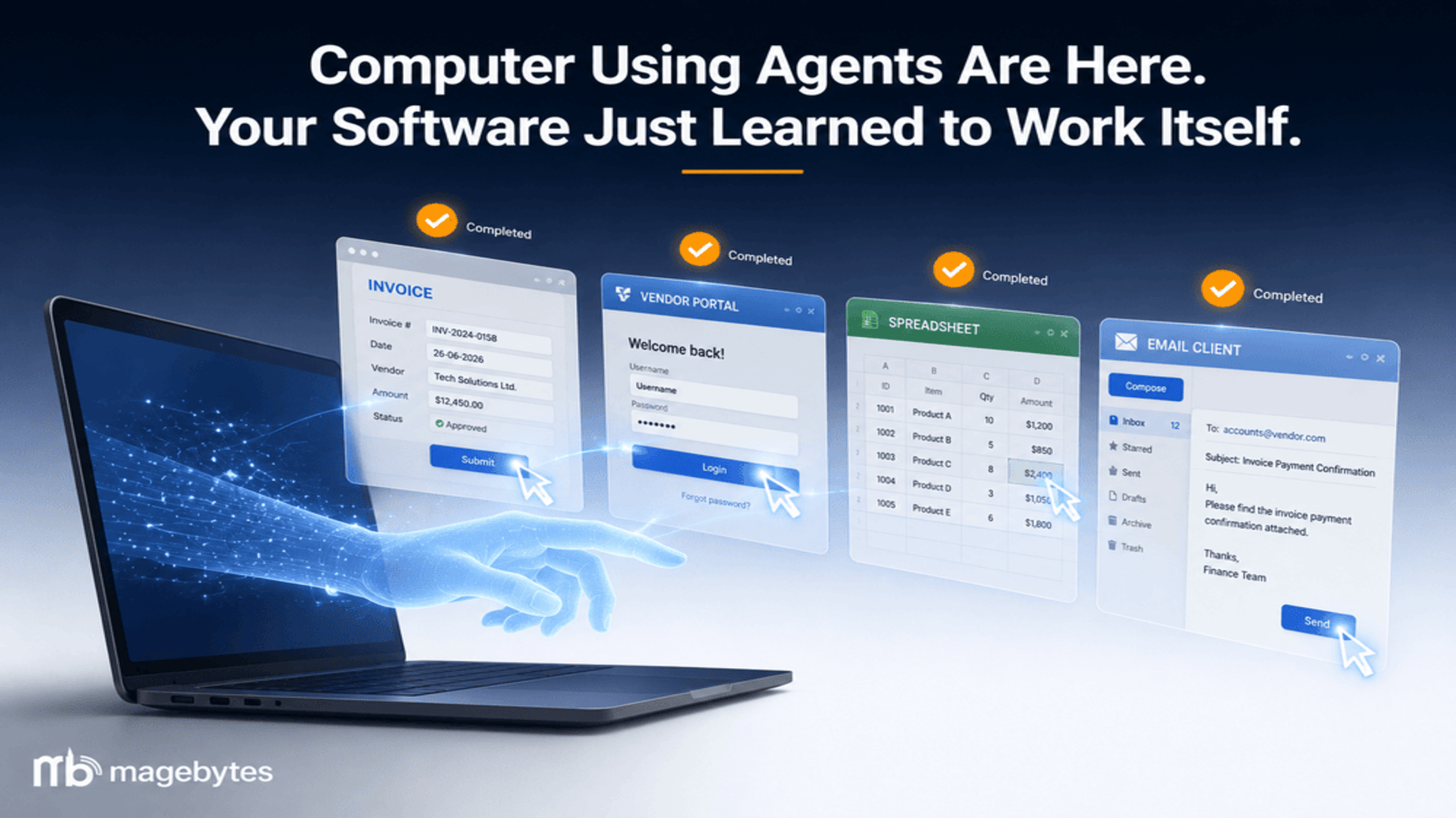
A computer using agent, often shortened to CUA inside Microsoft documentation, gives an AI agent the same basic tools a human employee has when working at a desk: a browser, a screen it can see, a keyboard and mouse it can control, and the reasoning ability to look at what is on screen and decide what to do next.
This is fundamentally different from how robotic process automation has worked for the past decade. Traditional RPA tools record a fixed sequence of clicks and keystrokes tied to specific pixel coordinates or HTML element selectors. The moment a vendor changes their website layout, moves a button, or redesigns a form, the automation breaks. Someone has to go back in, find the new selector, and rebuild the script. This maintenance burden is the reason so many RPA programs quietly die a year or two after launch.
Computer using agents work differently because they use vision and reasoning rather than hard coded selectors. The agent looks at a screenshot of the current state of the application, understands what it is looking at the same way a person would, and decides the next logical action based on the goal it has been given. If a vendor portal redesigns its login page, the agent adapts because it is reading the page the way a person reads it, not matching against a saved coordinate.
Why this matters for legacy systems specifically: Organisations with deep investments in proprietary platforms or older internal tools that were never built for integration no longer need to wait for a vendor to ship an API or commission an expensive custom integration project. A workflow that previously required either a multi quarter engineering effort or a team of contractors manually clicking through screens can now be handed to an agent that operates the existing interface directly.
What changed between preview and general availability
Computer use first appeared in Copilot Studio as a preview in September 2025, limited to vision and reasoning over Windows desktop applications in the United States and a small number of EMEA regions. The general availability release in May 2026 is a meaningfully more complete product, with four capabilities that simply were not present in the original preview.
- Model choice across vendors: Agent makers can now choose between OpenAI’s Computer Using Agent model and Anthropic’s Claude Sonnet 4.5 as the reasoning engine behind the agent, giving teams flexibility to match the model to the complexity and risk profile of the task.
- Secure credential storage through Azure Key Vault: Login credentials the agent needs to access vendor portals or internal systems are stored securely rather than embedded in scripts or shared documents, addressing one of the biggest security concerns IT teams raised during the preview period.
- Audit logging through Microsoft Purview, including session replay: Every action a computer using agent takes can be reviewed after the fact, with a visual session replay capability that lets compliance and security teams see exactly what the agent did, click by click. This is the baseline most regulated industries need before they will approve production deployment.
- Windows 365 Cloud PC pool support: Agents can run inside ephemeral, isolated Cloud PC environments rather than on a shared desktop, which improves both security isolation and the ability to scale agent execution across many simultaneous tasks.
Microsoft has also built in enterprise governance from the start rather than treating it as an afterthought. Admins can configure allow lists restricting which websites or desktop applications an agent is permitted to interact with, apply data loss prevention policies through the Power Platform admin center, and enforce environment isolation so that an agent built for one department cannot wander into systems it has no business touching.
A detail worth knowing before you build: Computer use only works with agents that have generative orchestration enabled. Agents still running on the older classic orchestration model in Copilot Studio cannot use the computer use tool until they are migrated. If your organisation has existing Copilot Studio agents built before this update, check the orchestration mode before assuming computer use is available to them.
Five Business Processes You Can Now Automate
The genuinely useful question is not whether computer using agents are impressive in a demo. It is which real, recurring, currently manual processes inside your business become worth automating now that the API requirement is gone. Here are five categories we see constantly across the businesses we work with, where computer using agents change the calculation.
Process 1: Vendor Portal Order and Status Checking
Almost every business that deals with suppliers, logistics providers, or B2B vendors has at least one portal that someone on the team logs into manually, searches for an order or shipment, and copies the status into an internal spreadsheet or system. These portals are notorious for having no public API, often because the vendor has no incentive to build one for every individual customer relationship.
A computer using agent can be given the task of logging into the vendor portal using securely stored credentials, navigating to the order tracking section, searching for a list of order numbers, reading the current status of each, and writing that information into a connected system such as Dataverse, an internal database, or even directly updating a record in a CRM.
For procurement and logistics teams checking dozens of vendor portals daily, this single use case alone can return hours of staff time per week, while also removing the human error that comes with manual copy paste work across multiple browser tabs.
Process 2: Legacy Internal Tool Data Entry and Reconciliation
Nearly every mid sized and enterprise organisation has at least one internal application that has been running quietly for years, built by a developer who has since left the company, with no documentation and no realistic path to a modern API. Finance teams in particular often deal with this in the form of an older accounting or ERP module that exists alongside newer cloud systems and requires manual reconciliation between the two.
A computer using agent can operate that legacy interface directly the same way a person would, reading data from one system’s screen and entering it correctly into another, reconciling two sets of records, and flagging discrepancies for human review rather than silently pushing through errors. This is precisely the kind of workflow Microsoft’s own GA announcement points to when it talks about reducing pressure to modernise or rebuild every legacy workflow before automation becomes possible.
For organisations running custom or older ERP environments alongside modern cloud tools, this is also a natural extension of the kind of custom ERP systems and integration work that connects disparate platforms without requiring a full system replacement.
Process 3: Compliance, Licensing, and Government Portal Filings
Government and regulatory websites are reliably among the least API friendly systems any business interacts with. Tax filings, licence renewals, compliance submissions, and regulatory status checks routinely require someone to manually log into a government portal, fill out forms with information pulled from internal records, and download confirmation documents for the company’s files.
A computer using agent configured with the appropriate human in the loop review step can handle the repetitive parts of this process: logging in, navigating to the correct form, populating fields from connected business data, and pausing for human approval before final submission on anything with legal or financial consequence. The session replay and Purview audit logging capabilities that shipped with general availability make this a far more defensible use case for regulated industries than it would have been under the September 2025 preview, since every step the agent takes is recorded and reviewable.
Legal and compliance teams that have historically treated this category of work as too sensitive to automate now have a credible audit trail to point to when evaluating whether to bring an agent into the process.
Process 4: Cross Application Customer Onboarding
Customer and employee onboarding processes are a classic example of work that touches many different systems, several of which were never designed to talk to one another. A new customer record might need to be created in a CRM, a corresponding account set up in a billing platform, access provisioned in a separate support portal, and a welcome sequence triggered in a marketing tool, with a human currently re-entering largely the same information into each system in turn.
A computer using agent can be given the onboarding checklist as a goal and step through each application in sequence, creating the relevant records using the new customer’s information, confirming each step completed successfully before moving to the next, and flagging anything that fails for human attention rather than leaving a half completed onboarding silently sitting in the queue.
This pairs naturally with the kind of CRM integration and automation work many growing businesses are already investing in, extending the value of an existing CRM setup by removing the manual data entry that sits around it rather than requiring a full platform rebuild.
Process 5: Competitive Price and Stock Monitoring Across Retail or Marketplace Sites
Ecommerce and retail businesses routinely need to monitor competitor pricing, stock availability, and promotional activity across multiple marketplace and retailer websites. Some of these sites offer limited public APIs, many do not, and even where an API exists it often does not expose the same information visible on the actual storefront page.
A computer using agent can visit a defined list of competitor product pages, read the displayed price, stock status, and any visible promotional messaging directly from the rendered page exactly as a shopper would see it, and log that information into a connected spreadsheet or dashboard on a recurring schedule. Because the agent is reading the visual page rather than relying on a specific API contract, it continues working even when a competitor redesigns their site or changes their page layout, which is precisely the scenario that breaks traditional scraping scripts.
For brands running active ecommerce stores who already track competitor positioning manually, this is one of the more immediately practical applications of computer using agents, turning a task that previously consumed real analyst hours each week into a background process that simply keeps a dashboard current.
What to Get Right Before You Deploy
General availability does not mean every model or every configuration is equally production ready, and a few practical details are worth knowing before committing a real business process to a computer using agent.
- Check which model is actually GA for your use case: As of Microsoft’s most recent documentation update, only OpenAI’s Computer Using Agent model and Claude Sonnet 4.5 carry a full general availability designation for the computer use tool specifically. Newer models such as Claude Sonnet 4.6 and Claude Opus 4.6 are listed as experimental within this particular tool, meaning they do not yet carry the same production support commitment. Confirm the current model status before locking in a build, since Microsoft updates this table on a regular cadence.
- Build in human review for anything with financial or legal consequence: Microsoft’s own governance guidance is clear that human in the loop review should sit in front of any action with meaningful downstream consequences. Use the agent to do the navigation, reading, and data entry, and keep a human approval step before anything is finally submitted, paid, or filed.
- Start with an app surface inventory: Before building, map out which internal tools and external portals your team interacts with manually, which ones have no API, and which of those processes are high frequency and low complexity. That intersection is where computer using agents deliver the fastest return.
- Migrate existing agents to generative orchestration first: If you already have Copilot Studio agents built on the older classic orchestration model, plan the migration step before assuming computer use will simply work, since the tool is not available to classic orchestration agents.
- Treat sovereign cloud environments as out of scope for now: Government Community Cloud, GCC High, and Department of Defense environments are explicitly excluded from this initial general availability rollout. Organisations operating in those environments should plan around that limitation rather than assuming feature parity.
Where This Leaves Most Businesses
The honest takeaway from this release is not that every business should rush to automate everything immediately. It is that the list of processes considered too difficult, too fragile, or too dependent on legacy systems to automate just got noticeably shorter, and most organisations have not yet sat down to recalculate which of their manual workflows now belong on the automatable side of that line.
Microsoft becoming the first major hyperscaler to ship computer use to full production grade general availability across all commercial regions is also a signal of where the rest of the industry is heading. Expect competing platforms to accelerate their own computer use capabilities through the remainder of 2026, which means the businesses that start identifying and piloting the right use cases now will have a meaningful head start over those who wait for the technology to feel fully mainstream.
MageBytes works with businesses across India and internationally to identify which manual, legacy, or cross application workflows are genuinely worth automating, then builds and governs the agent deployment properly from day one, including the audit and review structure regulated teams need. If you want a second opinion on which of your processes belong on this list, you can reach the team directly through the MageBytes contact page, or explore more about how we approach AI and automation projects on our website.
If there is a specific page on your site you would like a particular phrase linked to instead of the general homepage, such as a dedicated AI automation service page, a Power Platform or Dynamics service page, or a case study, share that link and the anchor text can be swapped in directly.
About MageBytes
MageBytes is a software and ecommerce development company based in Noida, India, with twelve years of experience helping businesses across thirty countries build, automate, and scale their digital operations. Our work spans Adobe Commerce, Shopify, Salesforce CRM, Microsoft Dynamics 365, and custom agentic AI solutions for enterprise and mid market clients.
Headquartered in Sector 63, Noida, Uttar Pradesh. Visit magebytes.com to learn more.