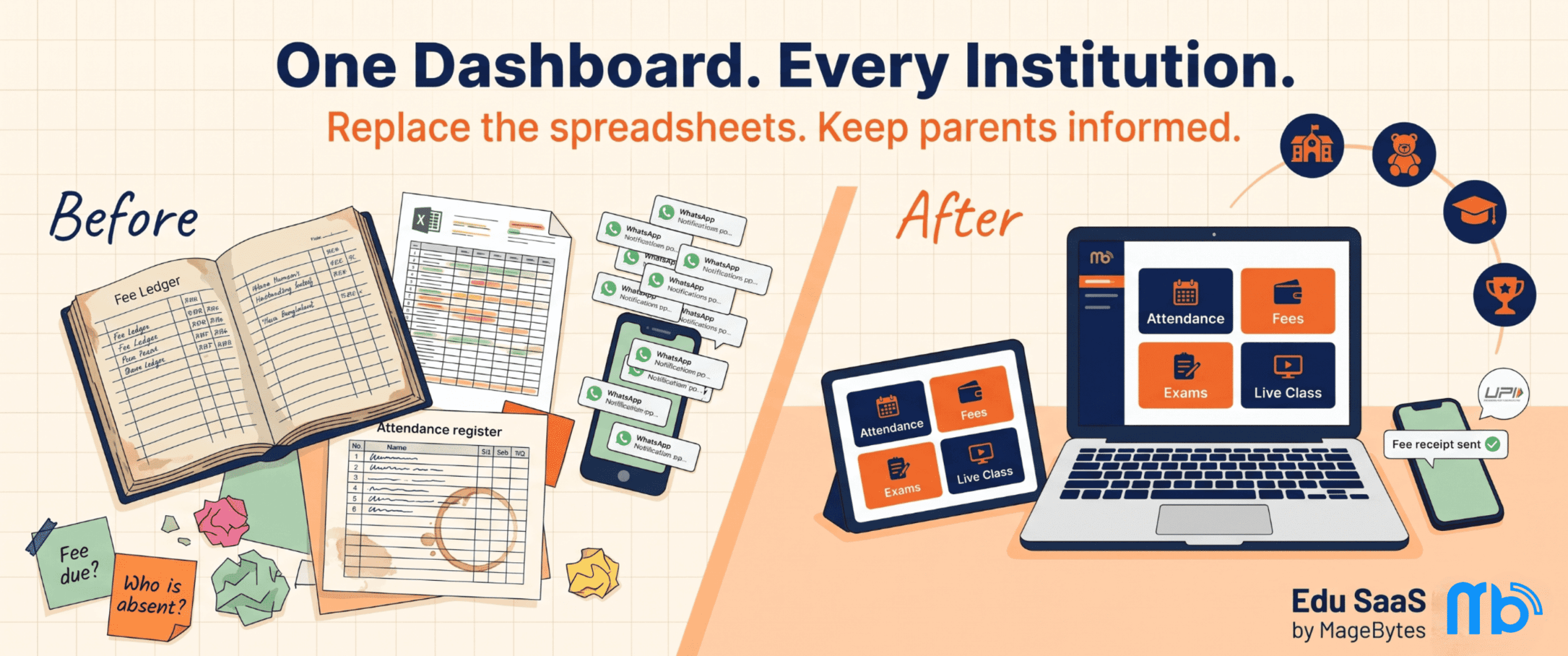
Whilst an accountant searches an Excel spreadsheet (which has been edited by three people), a parent is phoning to confirm receipt of the second stage of fees
Simultaneously a teacher is snapping an image of an attendance board and uploading it to WhatsApp in order to advise the reception of which students are not attending
Within another WhatsApp group a parent is enquiring as to why her son’s report card has not yet arrived. If you operate within the Indian education sector, then at some point you will have experienced a similar process
Paper, Excel and WhatsApp are used and maintained by between two and three individuals who know where information is stored
This functions well, until one of those people is absent for a week.
We created Edu SaaS school, college and coaching software. It enables all aspects of an educational establishment to be managed within one dashboard including attendance, live teaching, fees, examinations and parent updates. This can be for a single establishment or for a franchise comprising of twelve branches for example. Here I will explain the software’s functionality, and how it applies to schools, colleges and coaching institutes. I’ll also share key questions to ask any provider and explain how to begin using the service.
There is one organisation, one join code and one dashboard. You can select which modules you wish to use. Parents receive updates via WhatsApp, SMS and/or email no app is required.
Why spreadsheets and WhatsApp are not ideal
Whilst Excel is perfectly acceptable for managing a fifteen-student tutoring group, issues commonly arise when the volume of data exceeds an individual’s mental capacity to hold it. Surprisingly, this often occurs sooner than anticipated.
Common areas of concern:
Attendance: Paper or snapped attendance information must then be manually entered. Towards the end of a term, people no longer trust this. With Edu SaaS, staff and students can digitally register their attendance (with optional geolocation). Administration can also edit attendance. Teachers can then input attendance figures for each classroom or timetable slot. Parents can see exactly which slots their child was absent from. Generally, organisations activate the geo-attendance module first, alongside the attendance module.
Fees: An Excel spreadsheet can be utilised for fees. However, when a parent makes a 50/50 payment (now and next week, for example) the spreadsheet soon becomes a ‘to do’ list. Edu SaaS has a module which automatically manages part and staged payments together with alerts for late payments. Parents can pay fees online and an invoice is automatically sent. The accountant can view a unified fee book and it will display in exactly the same format whether money has been received at reception or via the online portal.
Parent updates
Whilst all information is broadcast to a class WhatsApp group, parents are often only interested in their child’s information. Consequently, they switch off the group and so miss crucial information. Parents (or guardians) receive personalised updates via WhatsApp, SMS and/or email. Furthermore, there is a portal where a parent can view just their child’s information.
Results
Marks are typically entered into a spreadsheet and then transformed into report cards at midnight. With Edu SaaS, marks for each subject can be entered as drafts. At a suitable time, these are published. Each student then receives a report card. Again, nothing is shown to parents until the school is ready.
Live teaching
Often the live teaching function and attendance monitoring are provided by separate services. From the dashboard, classes can be organised and initiated. Attendance is analysed according to how long students remain in a live session.
Admissions
Phone calls, face-to-face meetings and social media all provide sources of admissions leads. Sadly, half of these are not followed up. The admissions process takes a lead from initial contact and moves through to a trial session, then admission. Specific follow-up points are included at each stage. Once admitted, a student account is automatically generated.
Four types of education provider – one service
While most education software is designed for one type of organisation and then adapted to suit others, we have done the reverse. Our service adapts to fit the way in which a provider actually operates.
Schools
Whilst schools organise themselves around classes, our school management software recognises class levels (such as Class 5 or 10), and includes termly examinations, subject-based marking, grading and PDF report cards. The guardian portal is updated in real time. Deliberately, our school and college grading systems are distinct. Although this may seem trivial, there are differing guidelines relating to grading, terms and publication between the two. Combining these areas is frequently problematic.
Preschools
Whilst four-year-olds are not asked for report cards, parents often wish to know what their child has eaten. Our preschool management software includes a daily diary function which records meals, sleep, emotional state, photographs and nappy changes. It also allows authorised persons to collect children from the preschool. Guardians instantly receive WhatsApp alerts for this. Crucially, preschool users will never access examination or grading modules.
Colleges
Colleges organise themselves around degrees, semesters and credit accumulation. Our college management software can manage multi-year degree programmes and a semester-based curriculum for each college course. Teaching staff can also be allocated to particular courses. Grades can again be input as drafts and subsequently published for students to view.
Coaching and training
Coaching centres are organised around cohorts, exam results and admissions. Our coaching institute management software is franchise-ready from day one. Different branches can all deliver the same programme and have discrete cohorts. Diplomas and certifications can be offered. Furthermore, our service enables live, interactive mock exams to be organised with a real-time scoreboard. Students are allocated to particular cohorts. Maximum cohort sizes are controlled and a complete enrolment history is captured.
Most regularly utilised features
Although there is a wide range of features, below are those which are key in determining whether your workforce continues to use the software beyond the first week.
Fee and online payment
Fees can be added individually or as part of course and/or cohort fee structures. The software also recognises discounts, vouchers, sibling and early-bird concessions and so forth. Therefore, an accountant does not need to amend figures manually for families who are entitled to any of the above benefits.
Parents and students can pay fees using Razorpay, UPI and/or card. Payments are processed via Razorpay’s hosted payment gateway. As such, never is card or UPI information viewed or stored by the service. All payment confirmations are digitally signed. Confirmations cannot also be double submitted. Of all considerations, finance departments are especially keenly aware of this.
Live teaching and attendance
Teachers allocate a class to a cohort and simply click to initiate live teaching. Students can then access the class via a link. Information regarding who accessed the session, and for how long, is collated. Live teaching can be conducted via LiveKit or Daily, or alternatively on your own Zoom account if you prefer.
Analyzing attendance according to length of time spent in a live teaching session is a much better solution than undertaking a manual headcount. Post-session, the software will advise which students were present, late or absent. Teachers can then edit individual lines. For instance, a student should not be labelled as late if their connection was lost for ten minutes.
Parent communication – no app requirement
As there is no app, parents access the guardian portal via a standard website login. Alongside this, key information (for example, invoices, diary entries and grades) is also communicated to parents via WhatsApp, SMS and/or email. Parents of more than one child can login using one account and so view both children’s attendance, fees and grades. No student needs to share a password with their parent.
Multi-branches and role-specific dashboards
The number of branches which can be managed is unlimited. Appropriate branch administrators are appointed and the service automatically ensures that all elements – people, cohorts and fees for example – are correctly associated to the relevant branch. Each role – superadmin, organisation admin, branch admin, teaching staff, students and guardians – has a dashboard which is relevant to that role. Importantly, branch association is controlled at an API level, so that branch admins can never view data for other branches.
Mock exams
Generally, students frequently discuss the automated marking, instant feedback and live scoreboard produced by our mock examination module for coaching institutes. The same technology is also used to provide time-constrained quizzes as part of video, textual and/or document-based learning resources, which are again structured around cohorts. Students’ progress can thus be monitored.
Verifiable certificates
Certificates are associated to a student’s enrolment and include a publicly available QR code. Anyone – for example, employers and parents – can therefore validate a certificate by visiting the relevant page without needing to establish an account. For training institutes which issue diplomas, this avoids the embarrassment which can occur when an employer telephones to question the authenticity of a certificate.
AI teaching aide
Our AI can help to formulate teaching content, devise homework and draft curricula. However, this should always be checked by teachers prior to being presented to students.
Currently under development are two additional modules – branch expenditure and staff salaries and wages. During a demonstration, you can ascertain the current status of these.
Only activate desired modules
As outlined above, almost all service elements are modules which can be activated by organisations. Hence, our service does not feel cumbersome. Modules are categorised as Academics, Operations, Finance, Growth & Preschool, and AI & Innovation. A single-branch school or coaching institute will never activate the franchise module. Further, no element of the service presumes that an organisation has more than one branch. Similarly, preschools will never access grading and/or course modules. Moreover, a school which does not activate online payment functionality will never see the ‘Pay Online’ option. Unlike modules, neither notifications nor live teaching are module dependant – both are always available.
This modularity also facilitates training. Typically, organisations initially activate attendance and fee modules as these are the areas which most commonly create difficulties. Additional modules – for example, examinations, admissions and live teaching – can then be activated as and when the workforce begins to find core modules less engaging.
Security – the not so exciting, but essential, factor
Whilst student data is highly sensitive, few buyers investigate a provider’s security provisions until a problem arises. Below is clear explanation of our approach to this area. This is also a good set of criteria to present to any potential provider.
- Signed, httpOnly cookies. User logins are undertaken using a JWT cookie which is httpOnly. Even if this were ever accessed, scripts cannot interpret it.
- Encrypted passwords. All passwords are hashed using bcrypt prior to being stored within a database.
- Limiting calls to key functions. Login, registration and password reset are capped by IP address. This protects against cyber-attack and spam.
- Strong Content Security Policy. Only scripts and styling from the right sources can be accessed.
- Permanent audit logging. All authorisations, payments and changes to credentials are logged. This can be reviewed by administration.
- Restricted access. Again, this is managed at an API level.
Both data export and account deletion functionality is integrated. Thus, you do not become reliant on a provider for your data. Please review our privacy policy and data protection page prior to committing to any service.
Key questions to ask any school or coaching service provider
Although providers present impressive demos, it is during a disorderly month that their service is really put to the test. Below are key queries to ask us or indeed any other provider you are considering:
1. Can partial payments be handled automatically?
If a parent remits only half of a payment, can the system automatically recognise this and show the outstanding amount? Or is manual amendment of totals required by your accountant? Edu SaaS does this automatically.
2. Must parents download an app?
Many services are inadvertently let down by parents’ reluctance to download apps. Our solution does not require this. Parents can login to a standard website and in addition, key information is communicated to them via WhatsApp, SMS and/or email.
3. Is data for different branches restricted on the server or merely on the display?
Restricting data visibility does not equate to data security. Investigate where true data control is exercised. For us, this occurs at an API level.
4. Can unused modules be deactivated?
Preschools should not need to view examination or course modules. Offering modularity reduces training requirements and promotes clarity.
5. How is attendance analysed for live teaching?
Unless a Zoom live teaching session is accompanied by automated attendance recording, then the service has not provided value. Analysis of attendance according to time spent in a live teaching session – again with teacher editing facilities – is the appropriate method.
6. Can I export my data?
Please ask this prior to committing. Both data export and deletion are inherent within accounts.
7. What is the cost of the service and how is this determined?
Currently, there is no publicly available pricing structure for Edu SaaS. Charges are dependent upon your scale and the modules which you activate. Simply complete our quotation form, specifying your size and desired modules and a quotation for your situation will be issued. Some buyers dislike this approach. We would however much rather tailor quotes to your actual scale and module requirements as opposed to providing a ‘one-size-fits-all’ figure.
How to begin
No implementation process or sales meeting is needed.
1. Establish your organisation
Register for an account to receive a unique join code for your organisation. This code is used by your branches, staff and students. An organisation can be established and a join code generated in under a minute.
2. Activate relevant modules
Modules include fee stages, mock exams, timetabling and online payments. Only activate those modules which are pertinent to your organisation. Unwanted modules are not displayed.
3. Assign roles
Individual logins are generated for branch admins, teaching staff, students and guardians. These are authorised by an admin. Students are never permitted to self-enrol.
Or, if you prefer, arrange a demonstration. We will then guide you through a pre-established demo organisation which is suitable for your type of education provider. Our demo school, Sunrise Public School, utilises sample data and so nothing that you observe relates to an actual student. If you would prefer a brief conversation, please WhatsApp us or telephone on +91 852-725-9168.
Common queries
Can I use Edu SaaS for a single branch?
Yes. Multi-branch and franchise modules are just one of many available. Neither single-branch schools nor coaching institutes ever activate this module. No other elements of the service presume that an organisation has more than one branch.
What if my organisation does not require mock exams or online payments?
As noted above, nearly all service elements are modules which can be activated by organisations. Therefore, employees will never see irrelevant modules. Again unlike modules, notifications and live teaching are not module dependant.
Do parents need to download an app?
No. Parents login to a standard website to access the guardian portal. Parents also receive key information – such as invoices, diary entries and grades – via WhatsApp, SMS and/or email.
Is online payment secure?
As payments are processed via Razorpay’s payment gateway, the service will never view or store card or UPI information. Further, each payment confirmation is digitally signed. Confirmations also cannot be resubmitted.
Can I export my data if I cease using your service?
Yes. Data export and account deletion are both available.
What is the cost?
Currently there is no public pricing information. Complete our quotation form specifying your organisation’s size and desired modules to receive a quotation for your circumstances.
Can live online teaching be undertaken?
Yes. Teachers can allocate a class to a cohort. With one click, they can then launch live teaching. Students can then connect to the session via a link. Attendance is analysed according to who logged on and for how long. Live teaching can be conducted via LiveKit or Daily, or alternatively on your own Zoom account.
In conclusion
Ideally, you should not make the transition from paperworking during busy admissions periods. Choose a calmer term so that your workforce has the time and inclination to engage with new processes.
Initially, concentrate on managing attendance and fees as these are most problematic. Plus, they provide the quickest parental visual benefit. Subsequently, introduce further modules – such as examinations, admissions and live teaching – as and when the first two start to lose interest. You will then know that they are effectively being utilised.
Edu SaaS is developed by the MageBytes team. If you manage a school, preschool, college or coaching institute and continue to maintain your fee information in a notebook, then explore our service and/or review our comprehensive feature list to make your own decision.
Prepared to manage your education organisation via one service?
Receive all your organisation’s information – such as attendance, fees, examinations, live teaching and parent updates – within one dashboard. Quickly generate your organisation and obtain your join code.
Create your organisation | Book a demo