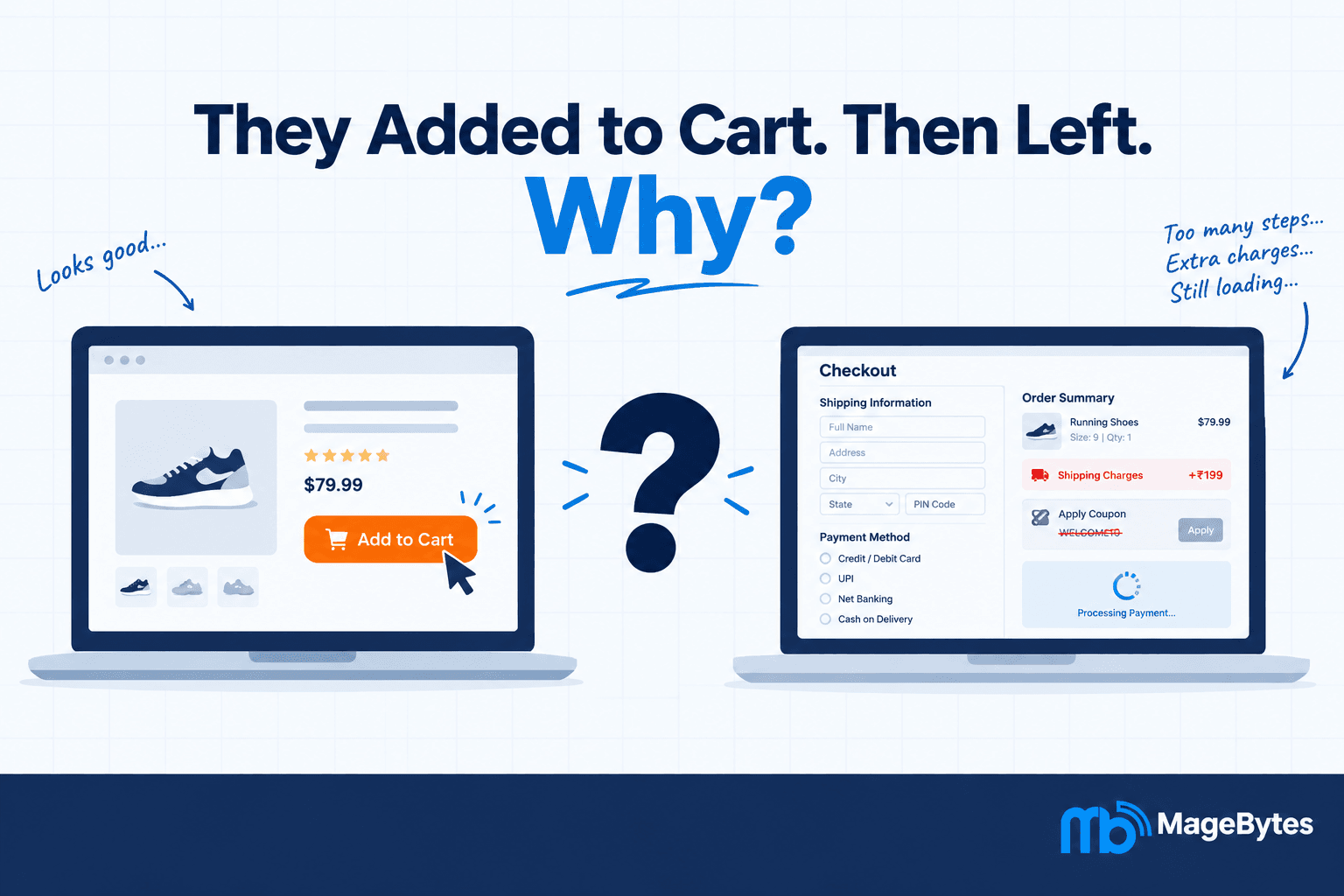
Every Magento store has payment methods it supports. What most stores do not have is control over when those methods are available, to whom, and under what conditions.
That gap causes real operational problems. Cash on delivery shown to international customers who cannot actually receive a COD order. Bank transfer offered on a small impulse purchase where the margin does not cover the manual reconciliation overhead. High-risk payment options available to guest customers who have no account history. Promotional payment terms visible to customers outside the qualifying customer group.
None of these are obscure edge cases. They come up regularly in stores that serve multiple customer types, ship to multiple regions, or run promotions with eligibility conditions. And the standard Magento configuration does not give you the tooling to handle them cleanly. Payment methods are either on or off globally, or on for a subset of payment methods natively. The conditions a real business needs, cart value, customer group, shipping destination, order weight, specific products or categories, require something beyond default configuration.
The MageBytes Payment Restriction extension for Magento 2 fills that gap. It gives store administrators a rule-based system for controlling payment method visibility at checkout, using the same Cart Price Rule condition builder already familiar to anyone who has managed promotions in Magento. This blog covers what the extension does, why the condition-based approach matters, and who needs this level of payment method control.
Why Default Magento Payment Configuration Is Not Enough
Default Magento lets you enable or disable payment methods globally and, for some methods, restrict by country. That is the extent of the built-in conditional logic. Everything else requires either a custom development project or a well-built extension.
The scenarios where those two settings are insufficient are common:
Scenario 1: COD only makes operational sense below a certain order value
Cash on delivery works for a 500 rupee order. For an order worth 15,000 rupees, the collection risk and the reconciliation overhead change the calculation significantly. A store that wants to offer COD for smaller orders but route larger orders to card or bank transfer has no native way to enforce that threshold in Magento. The payment method is either available or it is not.
Scenario 2: B2B customers on account terms need different payment options
A wholesale account on 30-day payment terms should not see the same checkout payment options as a retail customer. Magento B2B stores serving both customer types need a way to surface invoicing or purchase order payment for the trade customer group while showing card and wallet options to retail. This customer group distinction is one of the most common payment restriction requirements and native Magento does not configure it without custom work.
Scenario 3: International orders cannot use domestic-only payment methods
A bank transfer method set up for domestic customers does not work for an order shipping to Germany or Australia. Showing it at checkout for international customers creates a support burden when those customers select it and then cannot complete the transaction. A simple country-based restriction removes the option before the customer ever encounters it.
Scenario 4: High-value orders need verified payment methods
A store selling luxury goods or high-value equipment might have a policy that orders above a certain threshold must be paid by credit card or bank transfer, never by a wallet or BNPL method where dispute resolution is more complex. Without payment restriction logic, enforcing that policy requires manual order review rather than a checkout-level control.
The common thread across all of these scenarios is that payment method availability is a business rule, not a binary setting. The extension treats it that way.
How the Payment Restriction Extension Works
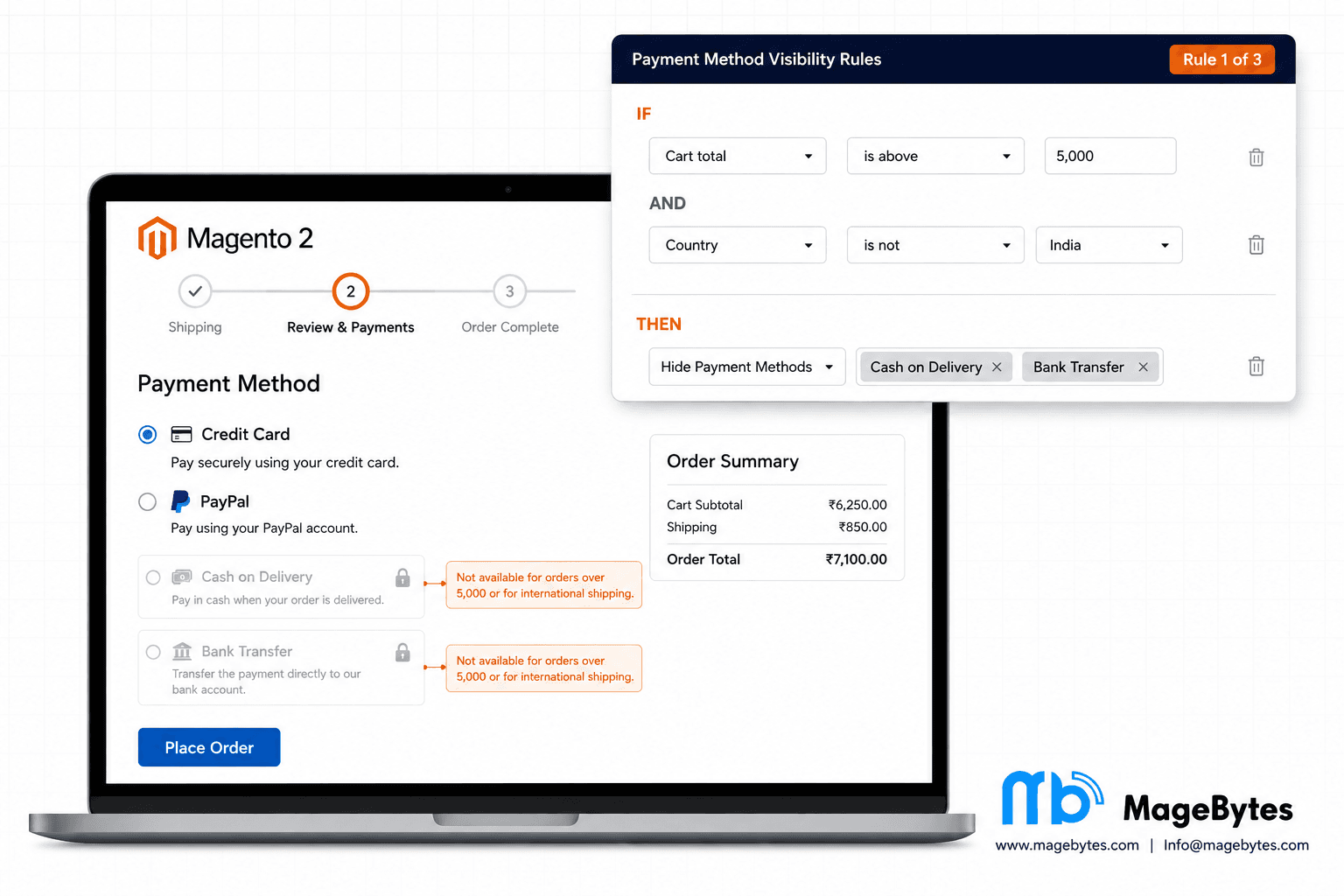
The extension adds a Payment Restriction rules section to Magento Admin, accessible under the Sales menu. Each rule is a named configuration object that defines a condition set and an action. When a customer reaches checkout, the extension evaluates all active rules against the current cart and customer context, applies the matching rules in priority order, and adjusts the visible payment methods accordingly.
If you have used Cart Price Rules in Magento, the interface feels immediately familiar because it is built on the same condition builder. The same nested condition logic, the same attribute matching patterns, the same boolean operators. The learning curve for anyone already managing promotions in Magento is minimal.
The two actions
Hide The Selected Methods: When the rule conditions match, the specified payment methods are removed from the checkout page. The customer cannot see or select them. All other enabled payment methods remain visible and selectable.
Show Only The Selected Methods: When the rule conditions match, only the specified payment methods are displayed. Every other enabled payment method is hidden. This is the inverse of the hide action and is particularly useful for checkout flows where you want to guarantee that a specific customer segment or order type can only use approved payment methods.
The condition types available
The condition builder covers the most common payment restriction scenarios without requiring any custom development:
- Cart subtotal: Set a minimum or maximum order value threshold. Below this amount, show COD. Above this amount, hide COD and require card payment.
- Cart weight: Restrict payment methods based on total order weight. Heavy freight orders that require invoice payment can be handled differently from lighter parcels where any payment method is suitable.
- Item count: Control payment availability based on the number of items in the cart. Useful for stores where order size determines fulfilment method and the payment method should align with that.
- Destination country, region, and postcode: The most common geographic restriction. Hide domestic-only payment methods for international orders, or restrict certain payment methods to specific postcode zones where delivery and payment collection constraints apply.
- Customer group: The B2B requirement. Show invoicing options only to trade customer groups. Show Buy Now Pay Later only to verified loyalty members. Control payment access by the customer’s assigned group without any custom code.
- SKU, category, and product attributes: Product-level payment restrictions. A store selling age-restricted products, regulated items, or high-value goods might require specific payment methods for those product lines regardless of other cart conditions.
- Nested condition combinations: Multiple conditions combined with AND or OR logic. A rule that applies when the cart total is above a threshold AND the customer is not in a verified customer group is a two-condition rule built in the same interface as a single-condition rule.
The condition builder in the Payment Restriction extension uses Magento’s native condition evaluation engine, which means conditions that work in Cart Price Rules work here too. Any merchant already familiar with Cart Price Rule configuration can build restriction rules without needing to learn a new system.
Scheduling, Priority, and the Rule Processing Model
Payment restriction requirements are not always permanent. A promotional payment method available only during a sale period needs to be removed when the sale ends. A seasonal COD restriction in a region with unreliable winter deliveries needs to switch on in November and off in March. Manual enable and disable of individual rules for these scenarios is manageable for one or two rules but fragile at scale.
The Payment Restriction extension includes optional From Date and To Date fields per rule. Set the date window and the rule activates and deactivates automatically without manual intervention. The extension evaluates the current date against the schedule on each checkout request, so rules engage and disengage precisely at the configured time rather than depending on someone remembering to toggle a flag.
Priority ordering and Stop Further Rules Processing
When multiple restriction rules match the same checkout session, the priority determines which rules take effect and in what order. Rules with lower sort order numbers are evaluated first, rules with higher numbers later. This ordering matters when rules might conflict, for instance when one rule hides a payment method and a later rule would normally show it.
The Stop Further Rules Processing flag on any individual rule halts evaluation of lower-priority rules when that rule matches. This is the same pattern as Cart Price Rules and gives administrators fine-grained control over which rules override which in complex configurations. A rule saying no cash on delivery for international orders with Stop Further Rules Processing enabled will prevent any lower-priority rule from overriding that restriction for an international order, regardless of what those rules would otherwise do.
Customer-facing messages
When a payment method is hidden because a restriction rule matched, a customer who was expecting to see that option at checkout has no explanation unless one is provided. The extension supports a configurable customer-facing message per rule. If COD is hidden because the order total exceeds the threshold, the message can say something like: Cash on delivery is not available for orders above a certain value. Please select card payment or bank transfer.
This reduces checkout abandonment from customers who are surprised by missing payment options. A brief, clear explanation is almost always better than the payment method simply disappearing without context.
Technical Behaviour Worth Knowing Before You Install
Rules apply everywhere, not just the storefront
One of the gaps in simpler payment restriction extensions is that rules only apply to the storefront checkout. An admin user creating an order from the Magento Admin panel sees all payment methods regardless of what the restriction rules would normally filter. For Magento stores where admin order creation is part of the workflow, particularly B2B stores where account managers place orders on behalf of customers, this gap means that restriction rules are only enforced for self-service orders, not for orders placed internally.
The MageBytes Payment Restriction extension applies restriction rules consistently across the storefront checkout, REST API requests, GraphQL, and Magento Admin order creation. A rule that hides a payment method for a particular customer group hides it everywhere that customer group is relevant, including when an admin creates an order attributed to a customer in that group.
No manual payment method syncing
Many payment restriction extensions require manual configuration of the payment method list within the restriction rule settings. When a new payment method is enabled or an existing one is disabled in Stores under Configuration, the restriction rule’s payment method list does not automatically update. This creates a maintenance overhead where restriction rules go stale as payment configuration changes.
The MageBytes extension pulls the payment method list live from the currently enabled payment methods in Magento configuration. Enable a new payment gateway and it appears automatically in the restriction rule options. Disable a method and it disappears. The restriction rules always reflect the current enabled state without manual resynchronisation.
No cache flush required after rule changes
Changes to payment restriction rules take effect without clearing the Magento cache. The extension evaluates rules on each checkout request rather than caching rule output, so a rule change made in the admin is visible to the next customer who reaches checkout. This is a practical convenience for store managers who need to activate or adjust a rule quickly, for instance in response to a payment gateway issue, without triggering a full cache flush on a live store.
Cache flushing is still required when changes are made to the extension’s configuration section in Stores under Configuration, such as toggling the global enable or disable switch. Changes to individual rule settings, conditions, actions, dates, and messages do not require a cache flush.
Compatible with Hyvä Theme and PWA Studio
The extension is tested on Hyvä Theme and PWA Studio builds in addition to standard Magento 2.4 installations. For stores running Hyvä for frontend performance, payment restriction rules apply through the same rule evaluation engine and do not require a separate Hyvä-specific build. GraphQL support means headless storefronts built on React or Vue frontends also receive correctly filtered payment methods based on the active restriction rules.
Who Should Install This Extension
B2B and wholesale stores serving multiple customer types
The customer group condition makes this extension particularly valuable for Magento B2B stores that serve both trade buyers and retail customers from the same storefront. Trade buyers on account terms need payment options (invoicing, purchase orders, bank transfer on extended terms) that retail customers should not see. The customer group condition handles this cleanly without requiring separate store views or custom code.
Multi-region stores with location-dependent payment methods
Any store selling internationally where certain payment methods are only available or appropriate for domestic orders needs country-based restrictions. COD that only works domestically, bank transfer details that only apply within a specific region, BNPL services not available outside certain markets. The country, region, and postcode conditions cover these requirements without requiring custom development for each new market.
Stores with high-value merchandise and fraud risk considerations
High-value items attract higher fraud risk. Limiting payment methods for orders above certain thresholds to verified card payment or bank transfer (rather than leaving wallet and BNPL options open) is a straightforward fraud mitigation measure. For Adobe Commerce developers building stores for clients in luxury retail, industrial equipment, or high-value electronics, this is often a client requirement that the extension satisfies directly without custom development work.
Stores running time-limited promotions with payment conditions
A promotional Buy Now Pay Later offer available only during a sale window. A zero-interest instalment payment method available for the first two weeks of a new product launch. A discounted bank transfer fee for orders placed before a certain date. These scenarios need payment restriction rules that turn on and off automatically without manual intervention. The scheduling feature in the Payment Restriction extension handles this with the From Date and To Date settings per rule.
Agencies managing complex Magento deployments
For a Magento development agency managing multi-site or multi-region client deployments, the per-website rule scoping is important. Each restriction rule can be assigned to specific websites within the Magento installation. A payment restriction that applies to the UK website does not need to be replicated or overridden for the US website. Rule management stays organised as the number of sites grows.
Pricing, Compatibility, and Installation
The Payment Restriction extension for Magento 2 is priced at $99 for the Community Edition (Magento Open Source) and $149 for the Enterprise and Adobe Commerce Cloud editions. Every purchase includes twelve months of free updates, direct engineer support, and a 30-day money-back guarantee.
The extension is compatible with Magento Open Source 2.4 through 2.4.9, Adobe Commerce on-premises 2.4 through 2.4.9, and Adobe Commerce Cloud. It is also tested and supported on Hyvä Theme and PWA Studio builds. Stability is listed as a stable build on version 1.0.0.
Installation follows standard Magento module conventions with no core file overrides. Configuration is handled through Magento Admin under the Sales menu. The global enable or disable switch in Stores under Configuration gives administrators a single killswitch for all restriction rules without needing to deactivate individual rules, which is useful when troubleshooting payment issues and wanting to temporarily remove all restrictions without losing the rule configurations.
If you run a Magento store that offers more than three payment methods and serves customers in more than one region or customer segment, there is almost certainly at least one payment restriction scenario your store needs that native Magento configuration cannot handle without this extension or a custom build that costs considerably more.
For questions about specific configuration scenarios, compatibility with your current Magento setup, or how the extension handles edge cases in your particular payment method configuration, reach the MageBytes team directly. You can also browse the full MageBytes extension library for other tools built for Magento merchants, including the Quick Order extension for B2B bulk ordering and the AI Content Generator for automated product descriptions.
The Bottom Line
Payment method control is one of those areas where the default Magento configuration feels sufficient until the first time a customer completes a COD order from a country where COD cannot be fulfilled, or a high-value order goes through on a payment method that carries fraud risk the store owner would have excluded if they could.
By that point the damage is already done and the fix becomes a custom development conversation. The extension costs $99 and handles the problem before it occurs.
That is a straightforward value case.
For any Magento store or Adobe Commerce deployment where payment method availability varies by customer segment, cart value, shipping destination, or promotion period, the Payment Restriction extension provides the rule-based control that default Magento does not. Get the extension from the MageBytes store with a 30-day money-back guarantee.
Control Every Payment Method at Checkout. No Custom Code Required. Cart value, customer group, shipping destination, product type, or date range. All handled by admin-configured rules. Community $99 | Enterprise $149. Get Payment Restriction for Magento 2.