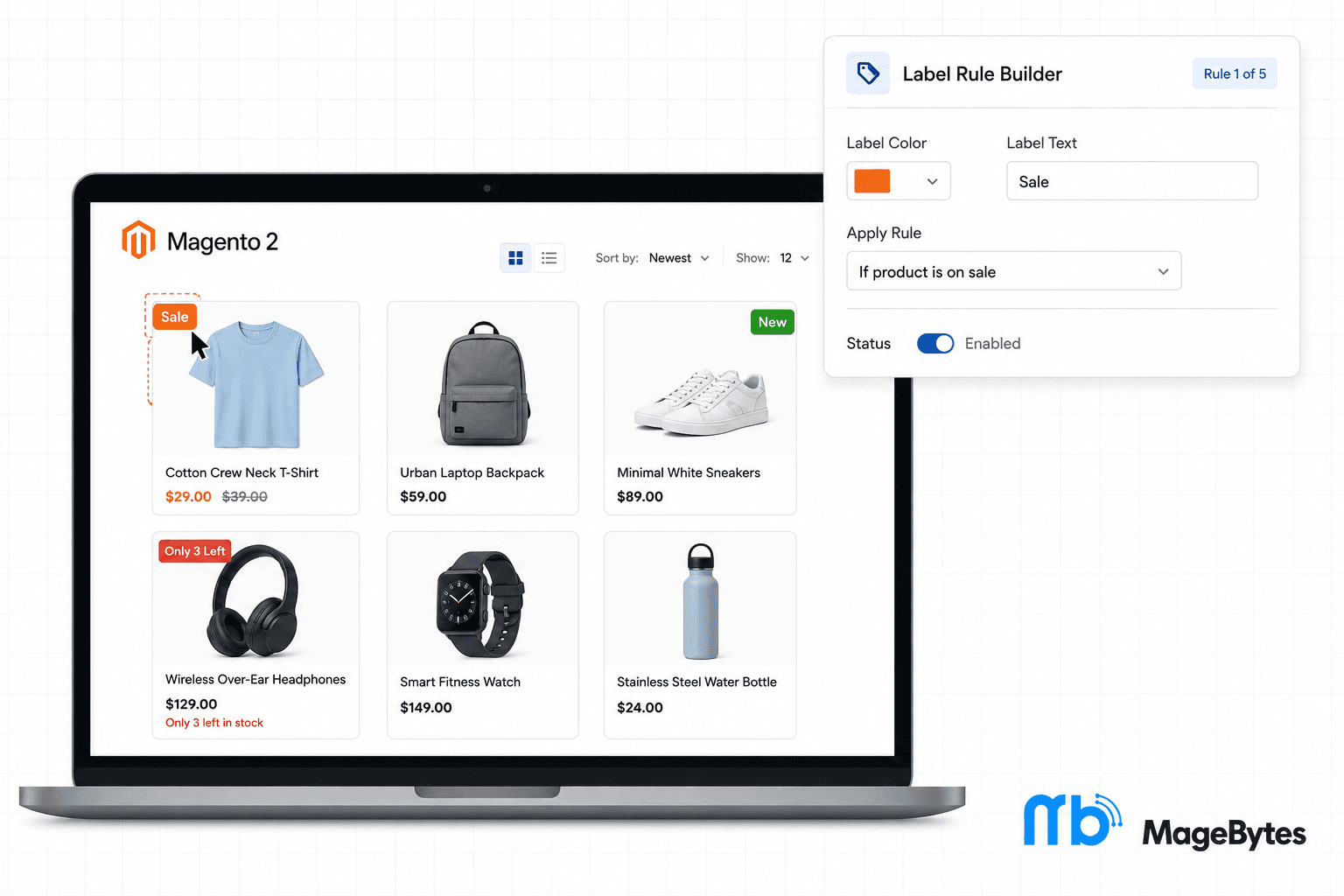
Think about the last time you scrolled through a product grid on some store you’d never visited before. You weren’t reading descriptions. You were scanning. And the tiles that actually stopped your thumb for a second probably had something extra on them. A little red Sale corner, a New badge, maybe a Only 2 Left warning that made you second guess scrolling past.
That half second of attention is basically the whole game in ecommerce. Nobody reads a product page before deciding whether to click into it. They react to whatever visual signal catches their eye first, and a plain product photo sitting next to a dozen other plain product photos rarely wins that fight.
Magento doesn’t give you a real way to do this out of the box. You can rename a category, you can write New Arrival into a product title if you’re desperate, but there’s no built in system for attaching a styled, rule driven badge to products based on what’s actually true about them right now. That’s the gap the Product Labels extension fills, and it’s one of those tools that looks small until you watch what it does to your listing pages.
Let’s walk through what MageBytes Product Labels for Magento 2 actually does, how the rule system works, and where it tends to make the biggest difference for stores that install it.
Why a Simple Badge Moves the Needle More Than People Expect
There’s a reason big retailers plaster their listing pages with badges. It’s not decoration. A well placed label does three things at once. It grabs attention in a crowded grid, it gives a shopper a reason to click that has nothing to do with price, and it creates a small sense of urgency without you having to write a single word of copy.
A Sale badge tells someone there’s a deal before they even open the page. A New Arrival tag pulls in the customers who specifically browse for what just landed. A Low Stock warning nudges the fence sitters who were going to think about it later and now don’t want to risk missing out. None of that requires a redesign or a marketing campaign. It requires a badge showing up on the right product at the right time.
The tricky part has never been the idea of using labels. It’s keeping them accurate. A Sale badge sitting on a product after the sale ends, or a New tag still showing on something you added six months ago, does more harm than no badge at all because it makes the whole store feel unmaintained.
Labels That Update Themselves Instead of You Updating Them
This is really the whole point of the extension. You’re not manually tagging products one by one and hoping you remember to untag them later. You build a rule once, based on whatever condition actually matters, price, category, stock level, a date range for a seasonal push, and the label just shows up on whatever matches and disappears the moment it stops matching.
Run a flash sale over a weekend. Set the label’s date range to match. The badge appears Friday night and quietly vanishes Monday morning without anyone touching the catalog. Same idea for stock level labels. As soon as inventory crosses whatever threshold you’ve set, the Low Stock badge shows up on its own, and it goes away again if you restock.
Two ways to build the label itself
Text labels: fully styled badges where you control background color, text color, font size, and border radius. You can match your brand palette exactly, or go with something loud and contrasting if the goal is to grab attention rather than blend in.
Image labels: upload your own badge graphics if you want something more custom than a text pill, a ribbon shape, a seasonal icon, whatever fits the campaign. Size and aspect ratio controls keep them looking clean whether someone’s on a large monitor or a phone.
What You Can Actually Control
Beyond the basic styling, there’s a decent amount of control over where and to whom a label shows up, which matters once you’re running more than a single storefront or serving more than one type of customer.
- Position options: place each label in the top left, top right, bottom left, or bottom right corner of the product image.
- Page targeting: show a label on product listing pages, product detail pages, or both, depending on where it actually needs to be seen.
- Store view targeting: run different labels on different store views if you’re managing multiple storefronts or languages out of one Magento instance.
- Customer group targeting: show certain labels only to wholesale accounts or VIP customers, so a promotional badge meant for one segment doesn’t show up for everyone.
- Configurable product support: labels can appear on configurable product children within listing pages, not just the parent product.
- Rule conditions: build conditions around product attributes, price, category, stock availability, and date ranges, and combine more than one when a label needs to be that specific.
It Still Runs Fast on a Big Catalog
Label logic that has to check every product against every rule on every page load can genuinely slow a store down once you’re dealing with a catalog of a few thousand SKUs. This is the kind of thing that doesn’t show up in testing on a small demo store and then quietly wrecks your load times once it’s live.
The extension handles this with an optional indexer that pre processes which products match which rules, instead of recalculating everything live on every visit. There’s also a configurable cache lifetime so you can tune how often labels refresh against how much load your server can comfortably handle. For a store with a large catalog and several active rules running at once, this is the difference between a feature you install and forget about, and one that ends up on your list of things to investigate when the site feels sluggish.
Where This Extension Actually Earns Its Keep
Stores that run frequent sales or flash promotions
If your promotions calendar is busy, manually adding and removing Sale badges across dozens or hundreds of SKUs eats up time that could go toward the sale itself. Date based rules take that off your plate entirely.
Catalogs with a lot of new arrivals
Fashion, seasonal goods, anything with regular new drops benefits from an automatic New label that expires on its own after a set number of days, rather than someone remembering to go remove it later.
B2B and wholesale stores running separate promotions
Customer group targeting means a wholesale specific discount label doesn’t accidentally show up for retail shoppers browsing the same catalog. This tends to matter a lot for Magento B2B stores running pricing tiers that shouldn’t be visible to everyone.
Multistore or multilingual setups
If you’re running several store views out of one Magento install, store view targeting keeps a promotion meant for one region from bleeding into another. This is a common ask from clients working with an agency managing multiple Magento storefronts.
Pricing and What’s Included
The Magento 2 Product Labels extension runs $79 for Community Edition and $148 for Enterprise or Magento Cloud editions. Every purchase includes twelve months of free updates, direct engineer support, and a 30 day money back guarantee if it turns out not to be the right fit for your catalog.
It’s built for Magento Open Source and Adobe Commerce on versions 2.4 through 2.4.9, running on PHP 8.1 or higher, and it’s tested on Hyvä Theme and PWA Studio as well. Installation doesn’t touch or override core files, so it sits alongside whatever else you already have running without creating conflicts.
If your listing pages currently look the same for every product, whether it’s on sale, brand new, or about to sell out, there’s a real chance you’re leaving conversions on the table. Labels are one of the cheapest changes you can make that shoppers actually notice within the first second of landing on a page.
Questions People Usually Ask Before Installing
Do labels update automatically, or do I still have to manage them by hand?
Once a rule is set up, labels appear and disappear on their own based on whatever condition you’ve defined. There’s no manual tagging involved after the rule is built.
Can I use my own badge graphics instead of a text label?
Yes. Image labels let you upload custom graphics, with size and aspect ratio controls so they render properly across different screen sizes.
Will this slow down a large catalog?
The extension includes an optional indexer and a configurable cache lifetime specifically so label rules don’t have to be recalculated on every single page load, which keeps performance steady even on catalogs with thousands of SKUs.
Can different customer groups see different labels?
Yes, labels can be restricted to specific customer groups, which is useful for wholesale pricing badges or VIP only promotions that shouldn’t be visible to every shopper.
Does it work on configurable products?
It does. Labels can display on configurable product children within listing pages, not only on the parent product.
If you want help mapping out which label rules make sense for your catalog, reach out to the MageBytes team. You can also browse the rest of the MageBytes extension library, including the Shipping Restriction and Payment Restriction extensions if checkout control is on your list too.
Give Shoppers a Reason to Click Before They Even Open the Page. Rule based badges for sale items, new arrivals, and low stock, styled your way and updated automatically. Community $79 | Enterprise $148. Get Product Labels for Magento 2.
About MageBytes
MageBytes is a software and ecommerce development company based in Noida, India. We build Magento 2 and Adobe Commerce extensions, ecommerce platforms, and enterprise integrations for clients across 30 countries. Our extensions are built and maintained by developers who work on live Magento stores every day, not just in theory.
Sector 63, Noida, Uttar Pradesh. magebytes.com | store.magebytes.com